In this lesson you will learn to
- Tell a question that needs retrieval from one that needs a query
- Predict which columns of a table an index turns into text
- Build a retrieval table that puts the problem and the fix in one row
- Control row text at build time with textColumns and textTemplate
Before you start
- The previous lesson, or a data connection with discovered tables
- Permission to create a table in the source database, or to call the Data API
A great deal of enterprise knowledge lives in databases rather than documents: ticket histories, case notes, CRM records. RAG over a database retrieves rows by meaning, and it only works when each row becomes text that can answer the question on its own. This lesson shows how VDF AI Data turns rows into text, what goes wrong with a raw table, and two ways to fix it.
One distinction first. Questions that need counts, totals or filters, such as “how many P1 tickets did we open in March?”, belong to a database query. Retrieval finds the rows that mean something close to the question, such as “how did we fix this last time?”. This lesson is about the second kind.
Step 1: Decide what a row must say
Take one real question: How did we fix VPN drops for people working from home? To answer it, a single retrieved row must contain the problem, the fix and, ideally, the knowledge-base article behind it.
The synthetic service desk has a resolved_tickets table with 160 tickets and 11 columns, among them summary, description, category, priority, resolution and kb_article. Run the health check from the previous lesson on it before indexing anything.
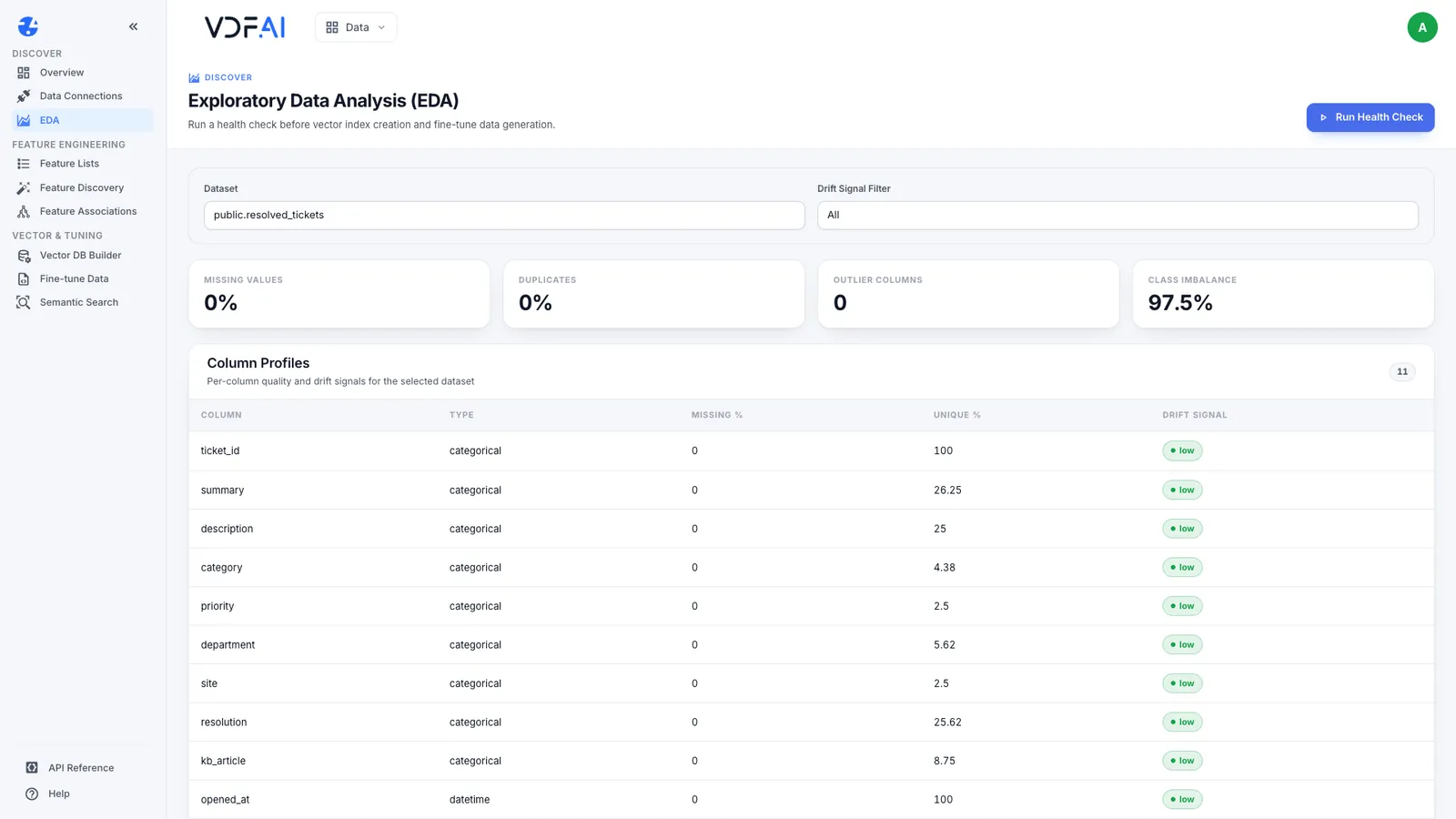
There are no missing values and no duplicate rows, but look at the Unique % column. Only 25% of the descriptions are unique: 160 tickets share 40 descriptions, because people describe the same problem in the same words. Keep that number in mind.
Step 2: Index the raw table and read what came back
Create an index on public.resolved_tickets with the default settings, build it and search it with the question.
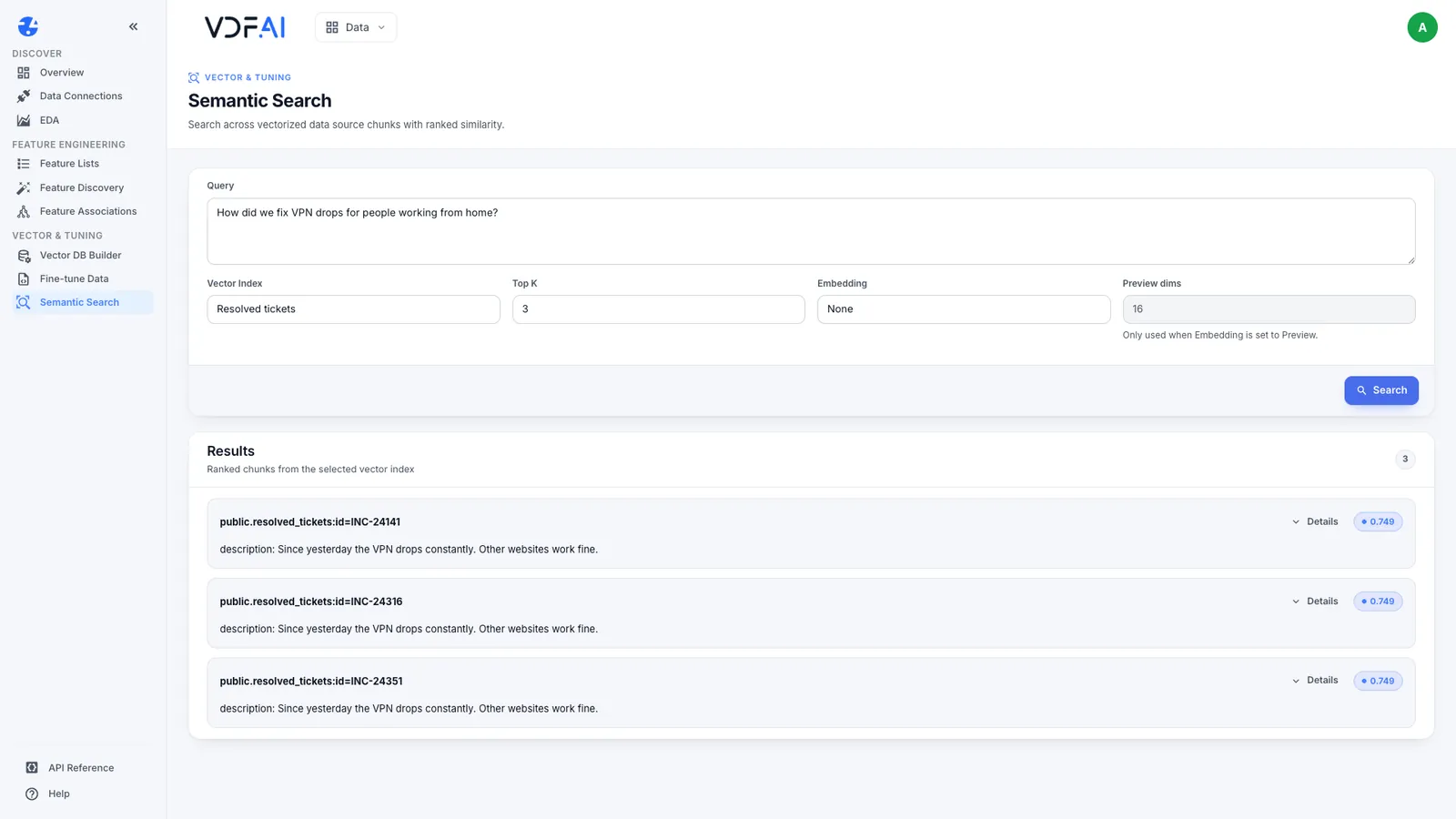
All three results are the same sentence, “Since yesterday the VPN drops constantly. Other websites work fine.”, from three different tickets, each scoring 0.749. Two things have gone wrong. None of the results says how the problem was fixed, so a model given these passages could not answer. And the three places in the result list went to one repeated sentence, pushing out tickets that might have held different fixes.
Step 3: Learn which columns become text
An index does not embed a whole row. When a build starts from the Build button, VDF AI Data applies these rules:
- If the table has text columns named
content,text,body,message,descriptionornotes, only those columns are embedded. - Otherwise every text column is embedded, each written as a
column: valueline. - The first column becomes the row’s ID in the source reference, as in
public.resolved_tickets:id=INC-24141. - A build reads up to 500 rows.
The ticket table has a description column, so the description is all that was embedded. The same rule explains the previous lesson’s results: kb_articles has a body column, so the article bodies were indexed and their titles were not.
Step 4: Build a retrieval table
The dependable fix is a table designed for retrieval, created in the source database by whoever owns the data: one row per distinct problem and fix, with both in a single text column.
CREATE TABLE ticket_resolutions AS
SELECT DISTINCT ON (summary, resolution)
  ticket_id, category, priority, kb_article,
  'Issue: ' || summary || '. ' || description
    || ' Resolution: ' || resolution AS resolution_text,
  resolved_at
FROM resolved_tickets
ORDER BY summary, resolution, resolved_at DESC;

ALTER TABLE ticket_resolutions ADD PRIMARY KEY (ticket_id);
GRANT SELECT ON ticket_resolutions TO academy_reader;
Three details matter. It is a table, not a view, because discovery lists tables and a view never appears as an asset. None of its columns has a name from the list in Step 3, so every text column is embedded, which puts the category, the priority and the KB article next to the fix. And the read-only account receives SELECT on the new table and nothing more.
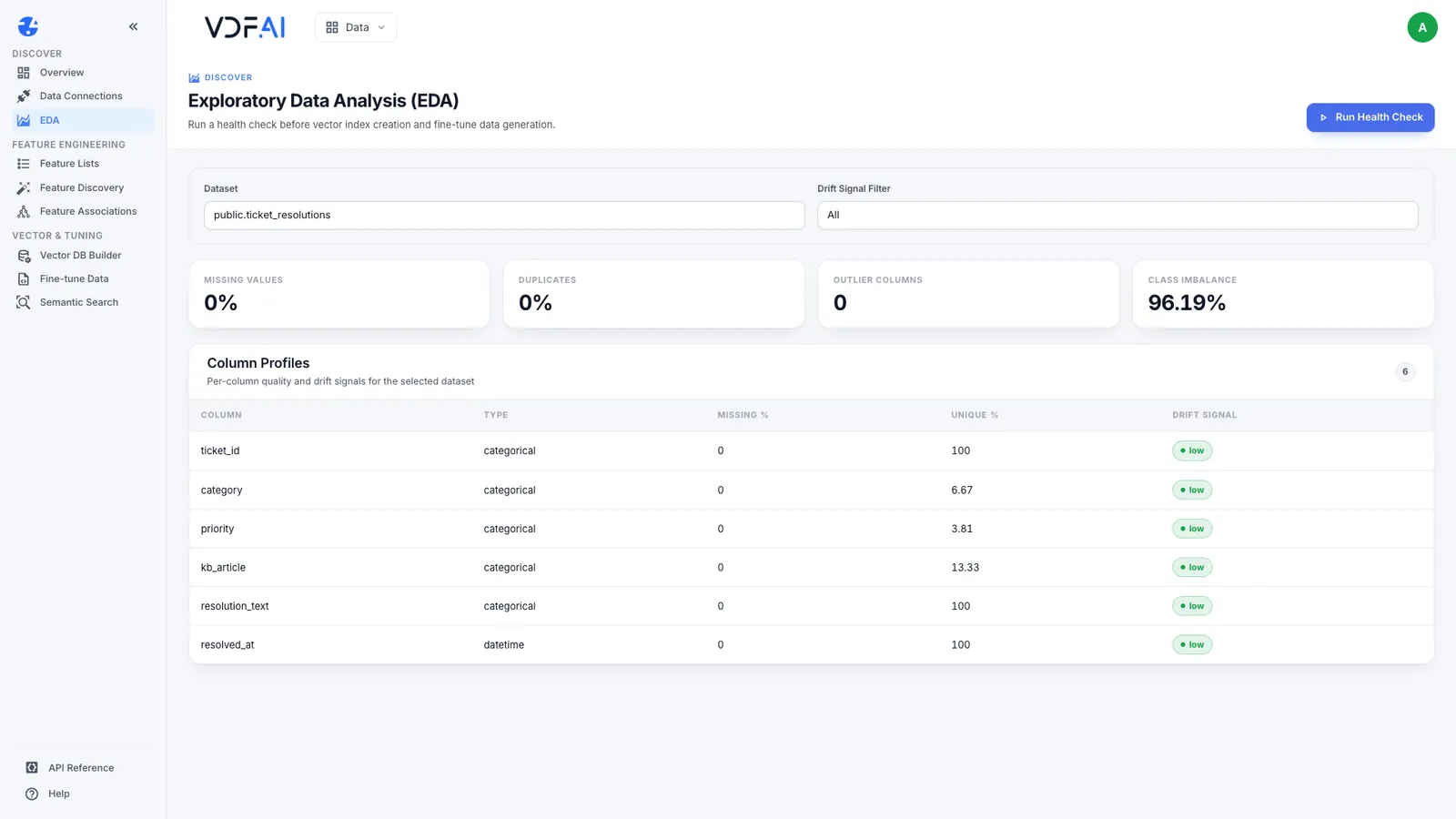
The result has 105 rows, and every resolution_text is unique. CREATE TABLE AS takes a snapshot, so schedule a rebuild that matches how quickly new tickets matter.
Step 5: Index it and compare
In Data Connections, choose Discover Assets again so the new table appears. Create an index on public.ticket_resolutions, build it, and run the same search.
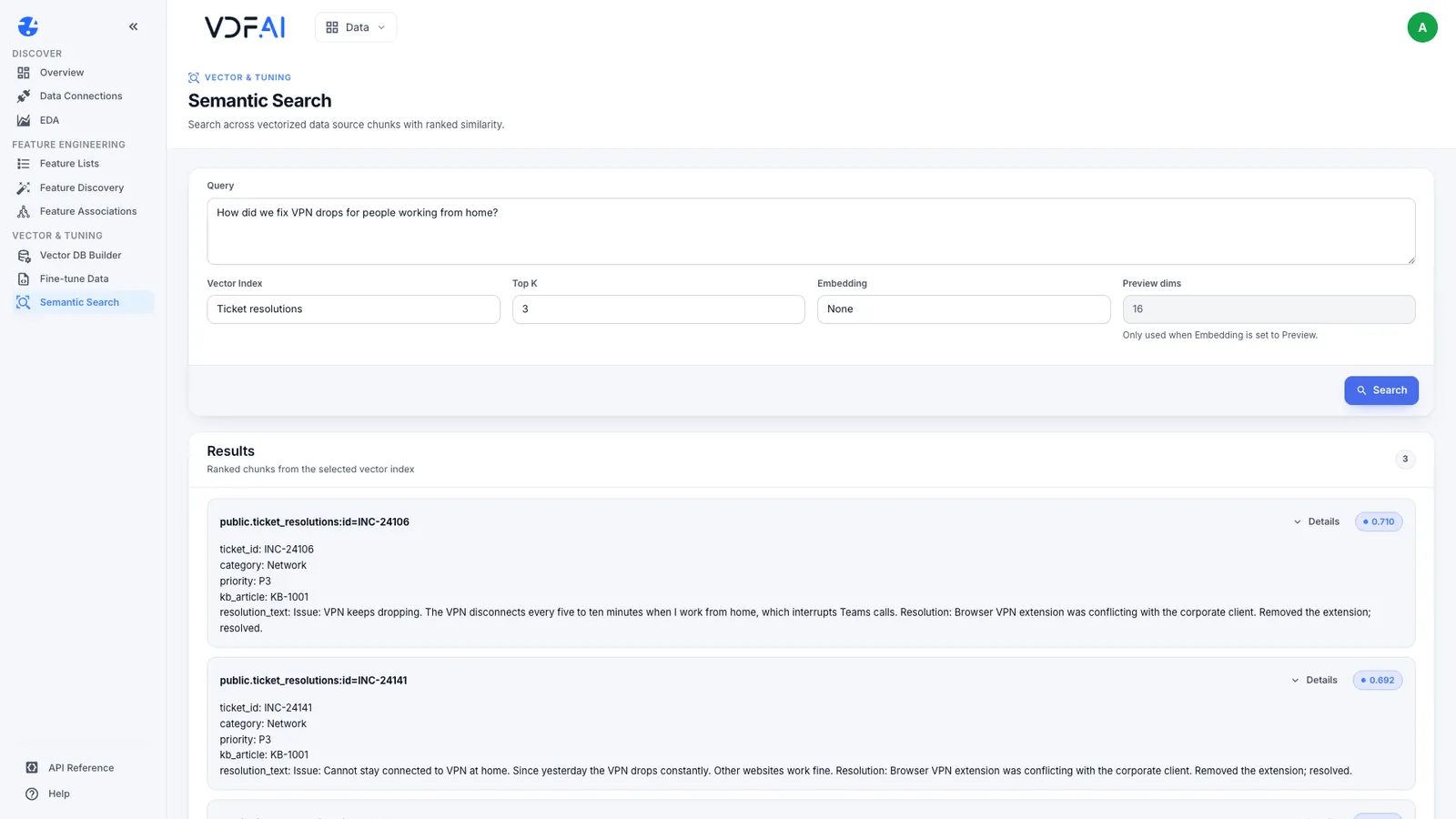
The top three are now answers. INC-24106 removed a browser VPN extension that conflicted with the corporate client, at 0.710. INC-24141 records the same fix for a differently worded problem, at 0.692. INC-24316 fixed it with a wired connection, at 0.667. Each result carries its category, priority and KB article.
The scores are lower than the raw table’s 0.749, and the results are far more useful. The raw descriptions matched the wording of the question closely and still could not answer it. Judge retrieval by whether the passage answers the question, never by the score alone.
Step 6: Or template the text through the API
When you cannot add a table to the source, control the text at build time instead. The build endpoint in the Data API reference accepts textColumns (which columns to read), textTemplate (how to write each row) and maxRows (up to 5,000). We built a second index on the raw ticket table with this body:
{
  "maxRows": 500,
  "textColumns": ["summary", "description", "resolution", "kb_article"],
  "textTemplate": "Issue: {summary}. {description}\nResolution: {resolution}\nKB article: {kb_article}"
}
It embedded all 160 tickets, each as an Issue, a Resolution and a KB article. The same question returned three fixes: INC-24351, where the VPN client was updated from version 5.9 to 6.2, at 0.717, followed by INC-24106 and INC-24141.
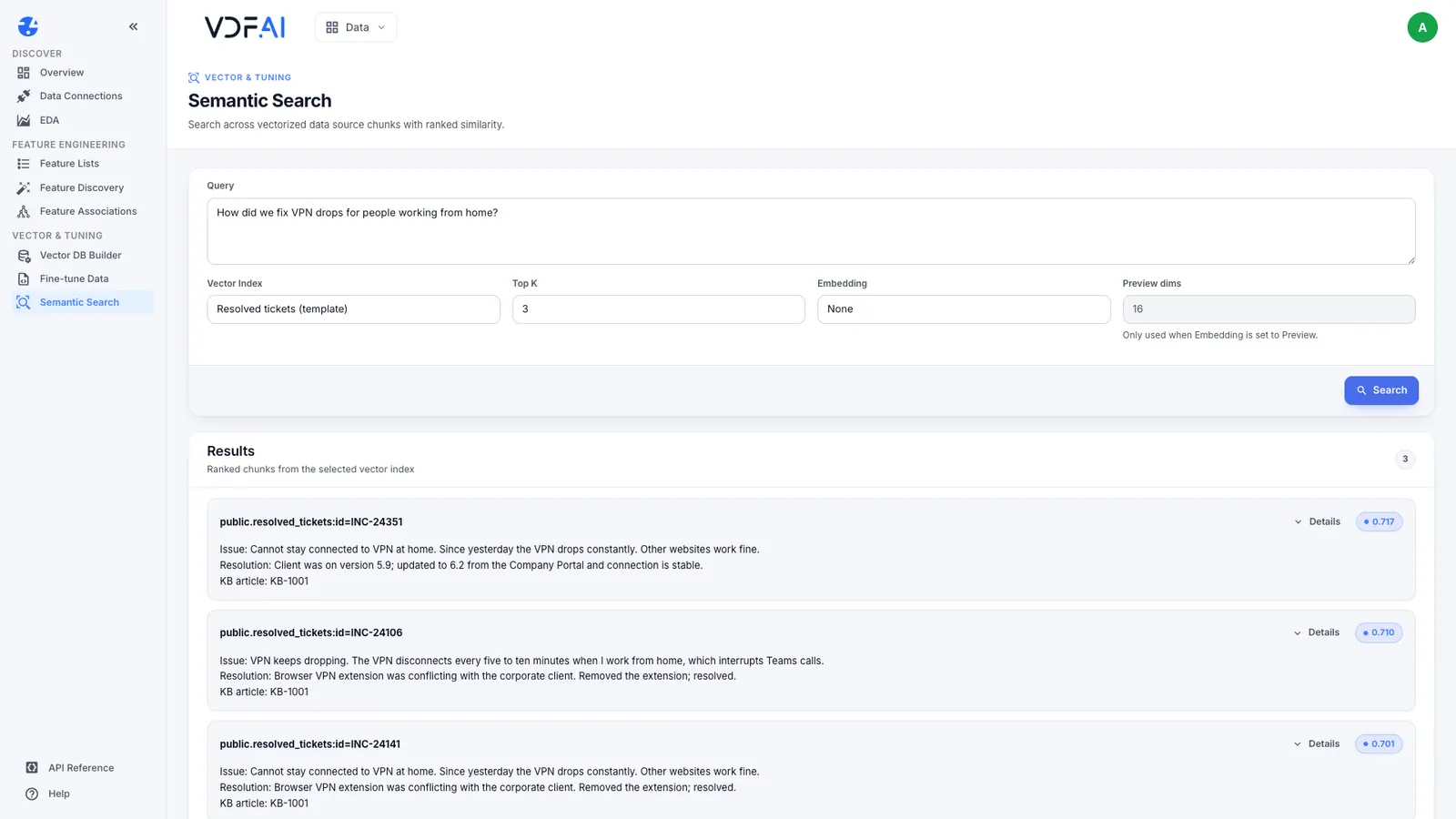
List textColumns whenever you use a template. A template can only use the columns that are read, and our first attempt without them failed, because only description was read. The two approaches trade off differently: the template keeps every ticket, including repeats of the same fix, while the retrieval table removes repeats at the source, where anyone reviewing the data can see them.
Check your understanding
Why did the raw ticket table return the problem but never the fix?
The table has a column named description, so only descriptions were embedded. The resolution column was never part of the searchable text, so no search could return it.
Why must the retrieval table be a table rather than a view?
Discovery lists tables, so a view never appears as an asset you can index. A table built with CREATE TABLE AS is also a snapshot, so rebuild it on a schedule.
When should a question go to a database query instead of retrieval?
When it needs counts, totals or exact filters, such as how many P1 tickets were opened in March. Retrieval finds rows by meaning, not by arithmetic.
Reference
Build it in VDF AI
Follow along in your own workspace. The Starter plan is free, with no credit card.
Try VDF AI freeSee it on your own data
Walk through this with a VDF AI engineer, on your infrastructure and your use case.
Book an architecture callGo deeper with an instructor
Production Agentic Systems: Multi-Agent, RAG and Governance: four live half-days, free for customers and partners.
See the course