In this lesson you will learn to
- Attach a document to a question and ask for the passage behind the answer
- Check a quoted passage against the source document
- Explain why a follow-up question needs the document attached again
- Recognise an answer that comes from general knowledge instead of your document
Before you start
- The first lesson in this path, or some time in VDF AI Chat
- A document you are allowed to upload, such as a policy or a procedure
Asking an AI about a document sounds simple, and mostly it is. The difficulty is knowing whether an answer came from your document or from what the model already believed about documents like it. Those two can sound identical. This lesson builds three habits that tell them apart.
We use a synthetic document throughout: the remote working and equipment policy of Example Ltd, a company that does not exist. It has five short sections covering who the policy applies to, working from home, equipment, security and working hours. Any policy or procedure of your own will work the same way.
Step 1: Attach the document to your question
Open Chat, choose New Chat and check the workspace chip; we used Default. Choose + under the message box, then Upload Files, and pick the document.
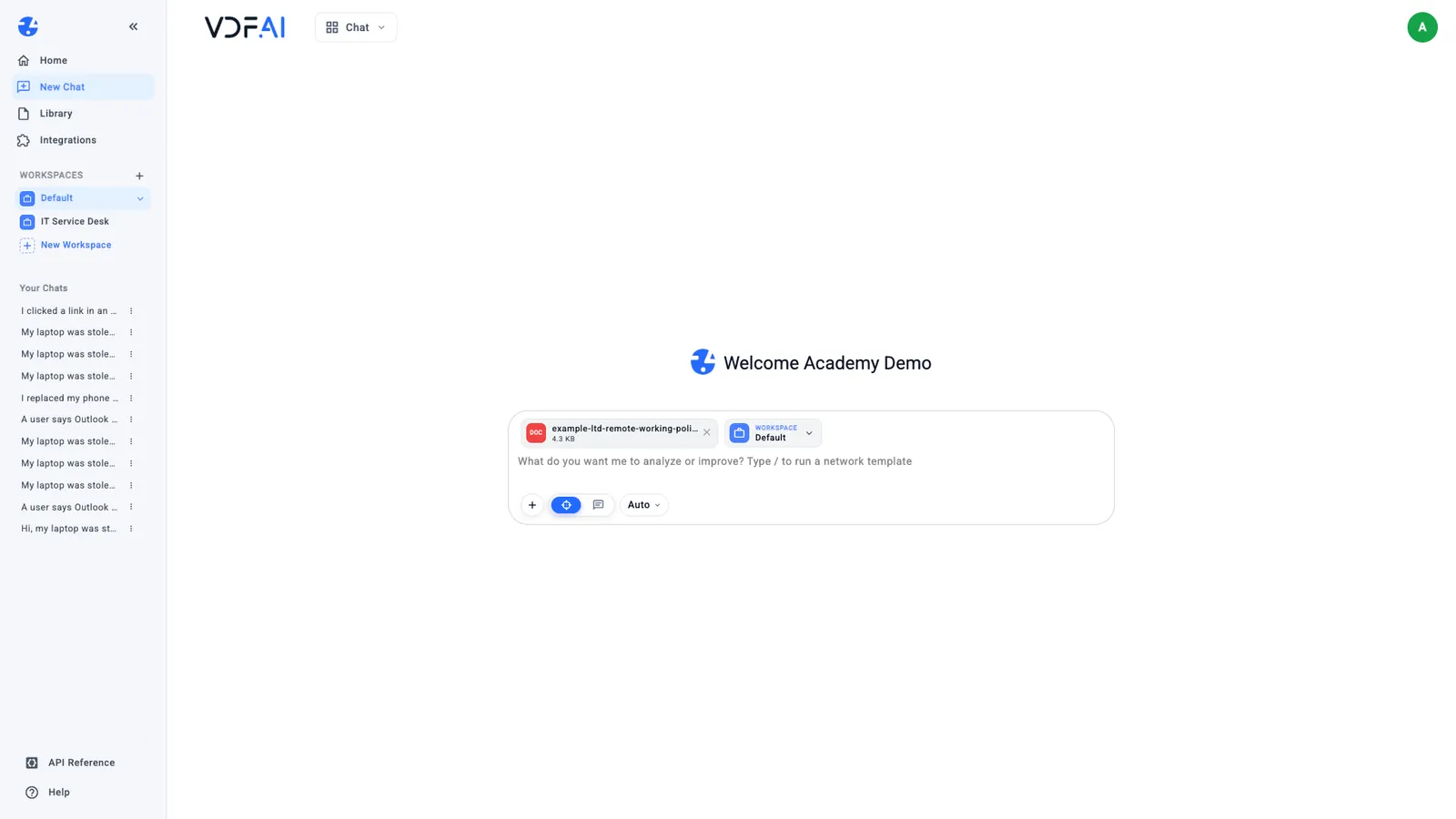
The file appears above the message box with its size. It is attached to the message you are about to send, and to that message only; Step 4 shows why that matters.
Step 2: Ask for the answer and the passage behind it
Ask a real question and point it at the document. We sent:
According to the attached policy, can I work from Spain for two weeks next month?
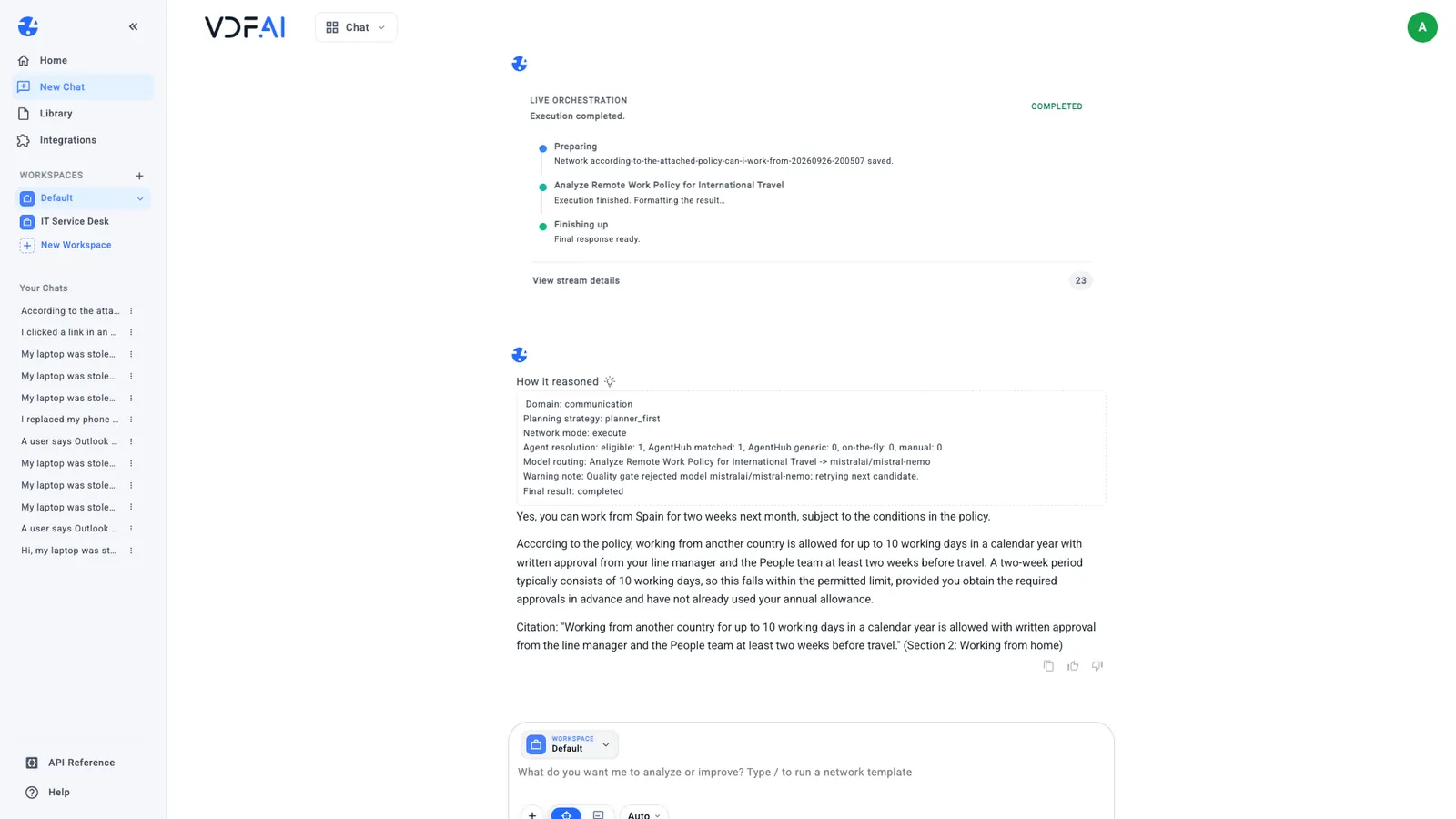
The answer was yes, with conditions: working from another country is allowed for up to 10 working days a year, with written approval from the line manager and the People team at least two weeks before travel. It added that two weeks is usually 10 working days, so the trip fits only if none of the allowance has been used. Then it quoted the sentence it relied on and named the section: Section 2: Working from home. Ours quoted its source without being asked; when an answer does not, add “quote the passage you relied on” to the question.
Above the answer, How it reasoned shows what VDF AI did: it planned one step, “Analyze Remote Work Policy for International Travel”, and lists which model ran it. You do not need to read it every time, but it is the first place to look when an answer seems off.
Step 3: Check the passage against the document
Open the document and find the quoted sentence. In ours, Section 2 says exactly that: up to 10 working days in a calendar year, written approval from the line manager and the People team, at least two weeks before travel. It also says longer periods are not permitted, which the answer did not need.
Checking one quote takes seconds and tells you two things: the answer came from your document, and the model read the right part of it. When a quote cannot be found in the source, treat the whole answer as unverified.
Step 4: Attach the document to every follow-up
Now ask a follow-up in the same chat, without attaching anything:
Can I use the home office allowance to buy a second monitor?
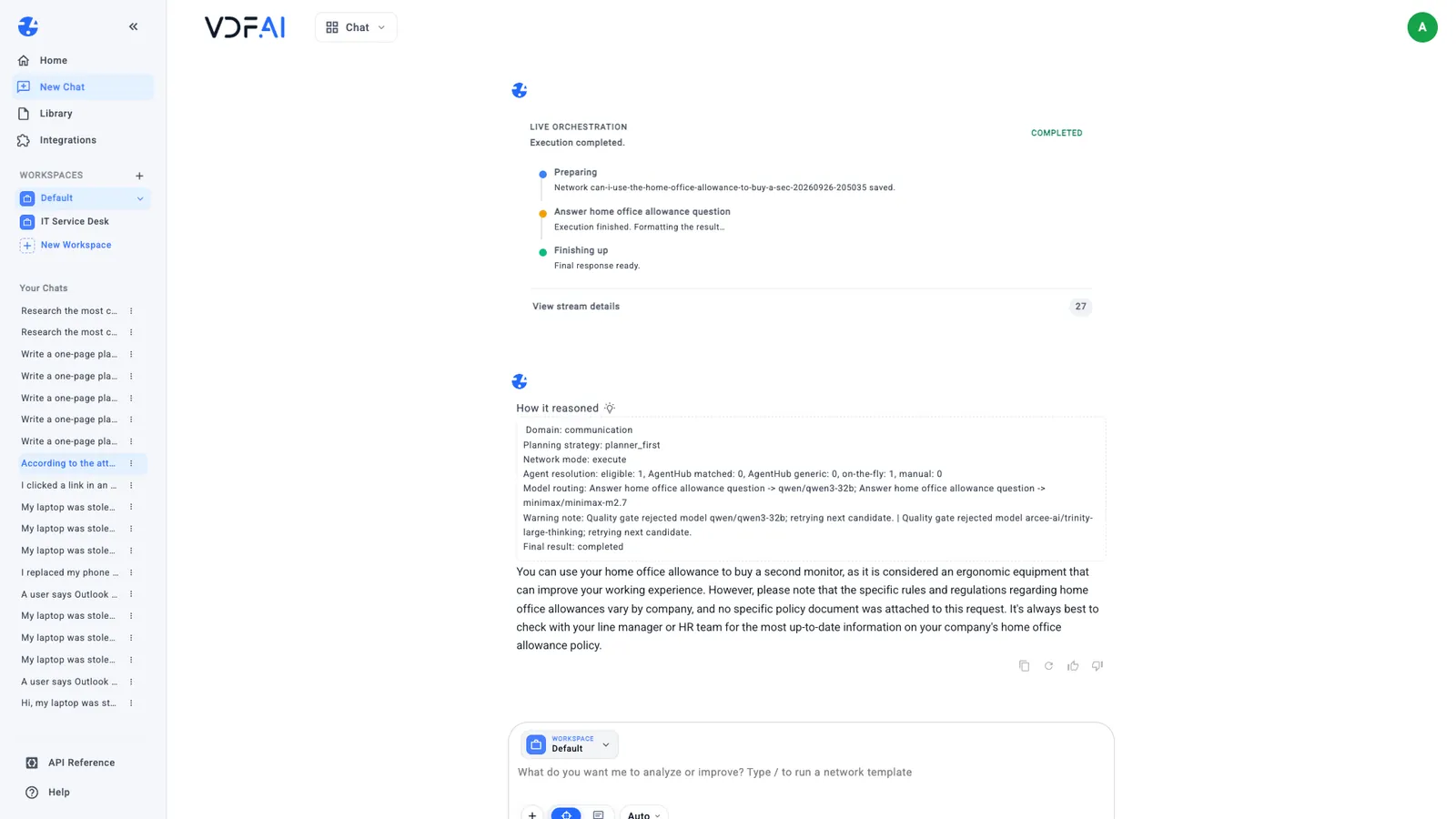
The answer was yes, a second monitor counts as ergonomic equipment. It also said, in passing, that no policy document was attached to this request. The policy was not part of the question, so the answer came from general knowledge, and for this company it was wrong.
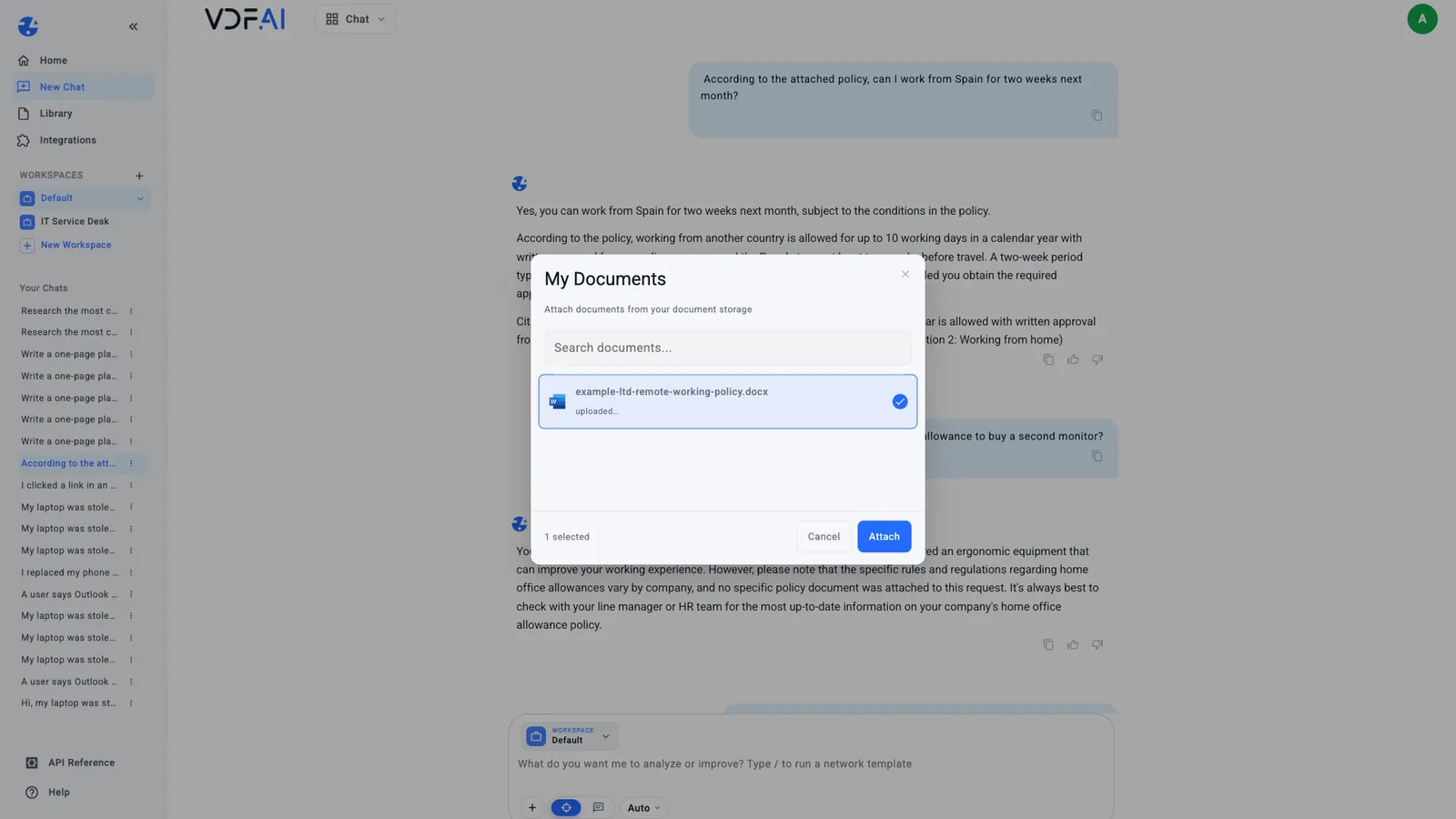
Ask again with the document attached. Choose +, then My Documents, tick the policy and choose Attach.
With the policy attached, VDF AI planned three steps: extract the equipment rules, evaluate eligibility and draft the reply. It took about 70 seconds and answered no. The £150 allowance is for a chair or a desk, every employee already receives one external monitor, and the rule is in Section 3.
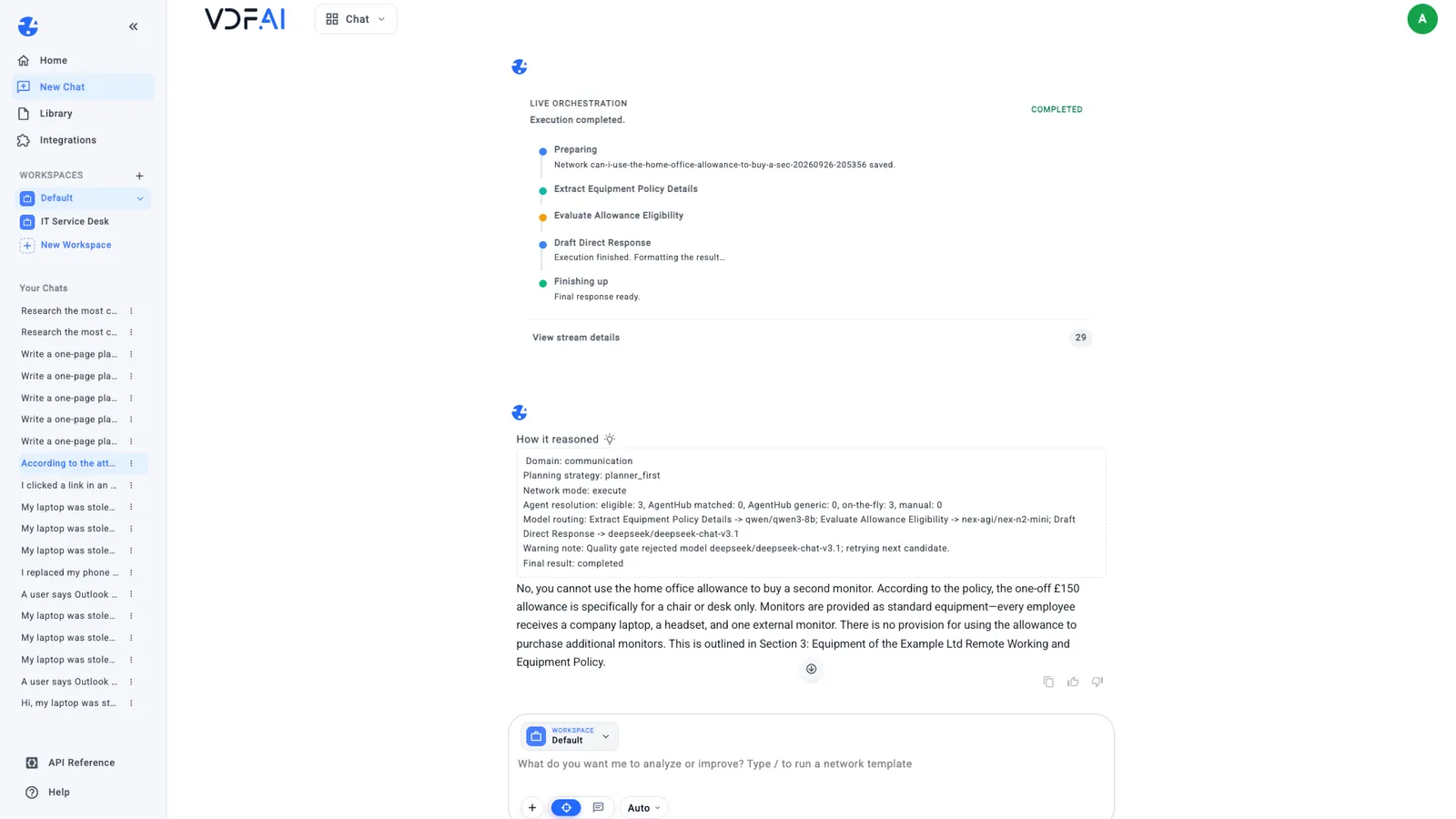
The lesson is simple and easy to forget: a chat remembers the conversation, but an attachment belongs to the one message it was sent with. Attach the document to every question that depends on it.
Step 5: Ask what the document does not say
A good test of any document answer is a question the document cannot answer. We asked, with the policy attached:
What does the policy say about working from home during a train strike?
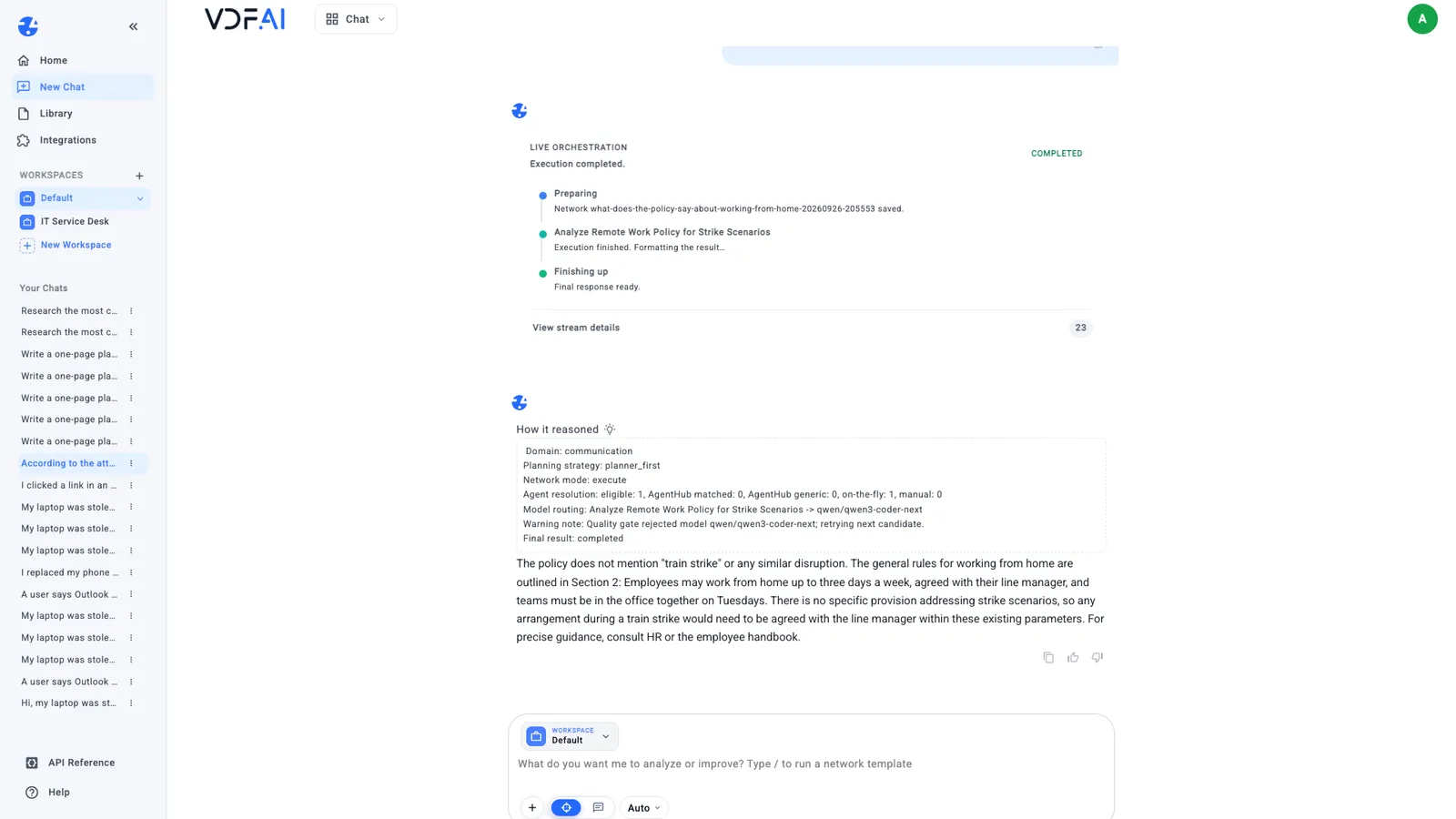
The answer said the policy does not mention train strikes or any similar disruption, then gave the nearest rule it does contain: up to three days a week at home, agreed with the line manager, with the team in the office on Tuesdays. That is the behaviour you want. Asked without the attachment, the same question drew general advice about what employers often allow during strikes, which again sounded plausible and came from nowhere in particular.
If your answers invent a rule for a question like this, the document probably was not attached, or the question was too loose to tie to it.
Step 6: Reuse documents from your Library
Everything you upload is kept in the Library, under Uploaded, so you only upload a document once. From any chat, + and My Documents attach it again, and the Library lets you download or delete it when it is no longer needed.
Attaching works well for a handful of documents and one person’s questions. When a whole team keeps asking about the same set of policies, index them once with the Private RAG Engineering path instead, so that every answer searches the same approved sources.
Check your understanding
Why did the second-monitor question get a wrong answer the first time?
The follow-up was sent without the policy attached, so it was answered from general knowledge. The answer even said that no policy document was attached. With the policy attached again, it said no and quoted Section 3.
What should a good answer do when the document does not cover the question?
Say so, then point to the nearest rule the document does contain. Our answer said the policy does not mention train strikes and quoted the general working-from-home rule in Section 2.
How do you attach a document you uploaded earlier?
Choose the attachment button, then My Documents, and pick it from the list. Uploaded files are kept in the Library, so there is no need to upload them again.
Reference
Build it in VDF AI
Follow along in your own workspace. The Starter plan is free, with no credit card.
Try VDF AI freeSee it on your own data
Walk through this with a VDF AI engineer, on your infrastructure and your use case.
Book a demoGo deeper with an instructor
Advanced Agent Building: Skills, Tools and MCP: four live half-days, free for customers and partners.
See the course