In this lesson you will learn to
- Decide which systems belong in an AI system register and what to record for each
- Register internal, vendor and shadow AI systems with an accountable owner
- Classify each system by EU AI Act risk tier and read the rationale
- Spot a rationale that reaches a plausible tier for the wrong reason
- Use the gap report to see what a high-risk system still lacks
Before you start
- Access to VDF AI Compliance in your deployment
- A list of the AI tools your organisation uses, however rough
An AI system register answers the first question any EU AI Act review asks: which AI systems do you use, who is responsible for each and how risky is it? Without it, every later step, from documentation to training, has nothing to attach to.
This lesson builds a register in VDF AI Compliance for Example Ltd, a synthetic company. Nothing in it is legal advice: the platform drafts classifications, and a person with the right expertise confirms them.
Step 1: Decide what goes in the register
Include every AI system in use, not only the ones someone approved. For Example Ltd that means four:
| System | Where it comes from | Why it is in scope |
|---|---|---|
| CV screening assistant | Built internally | Scores job applicants |
| IT ticket triage agent | Built internally | Classifies and drafts replies to staff tickets |
| Meeting notes assistant | A vendor’s product | Records and summarises internal meetings |
| Public chatbot used by the finance team | Nobody approved it | Staff paste supplier emails into it |
For each one, write down four things before you open the product: what it does, what data it processes, how many people use it and the person accountable for it. An owner is a named role, not a team.
Step 2: Register a system
Open Compliance from the applications menu and choose AI System Register, then Add System. The form asks for a name, an owner, the use case, the data processed, the number of users, the source (Internal, Vendor or Shadow AI), a risk tier, an Annex III category and two coverage flags: whether the system has Article 11 documentation and whether it has Article 14 human oversight.
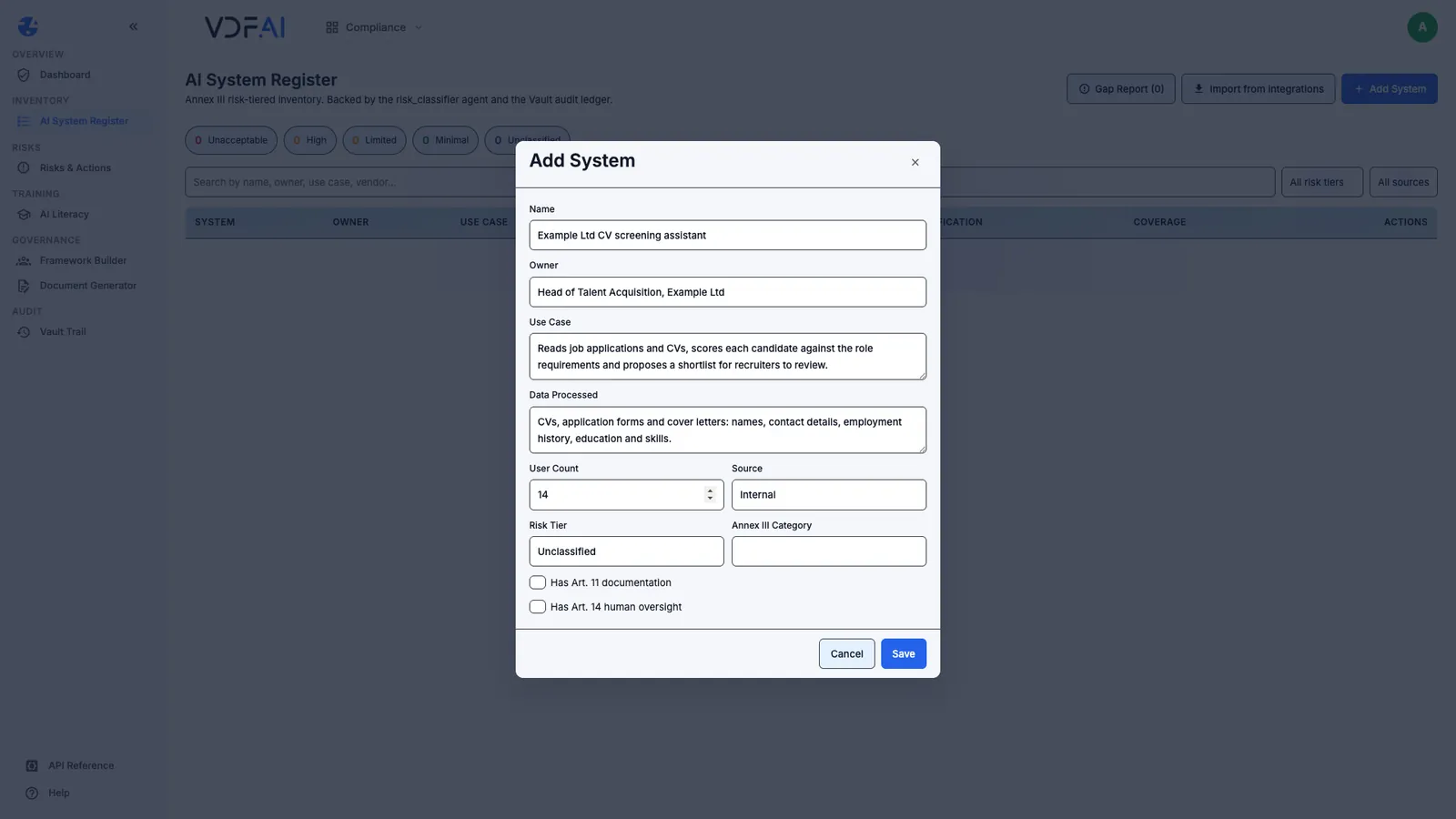
We registered the CV screening assistant with its owner, the Head of Talent Acquisition, 14 users and Internal as the source. We left the risk tier as Unclassified and the Annex III category empty, so that the classification in the next step starts from the description rather than from our guess. Both coverage flags stay unticked, because neither is true yet.
Write the use case and the data as plainly as you would to a colleague. The classifier reads those two fields, and so will anyone who audits the register later.
Step 3: Classify it and read the rationale
In the system’s row, choose the scales icon, Classify with risk_classifier. Our classification came back in 23 seconds.
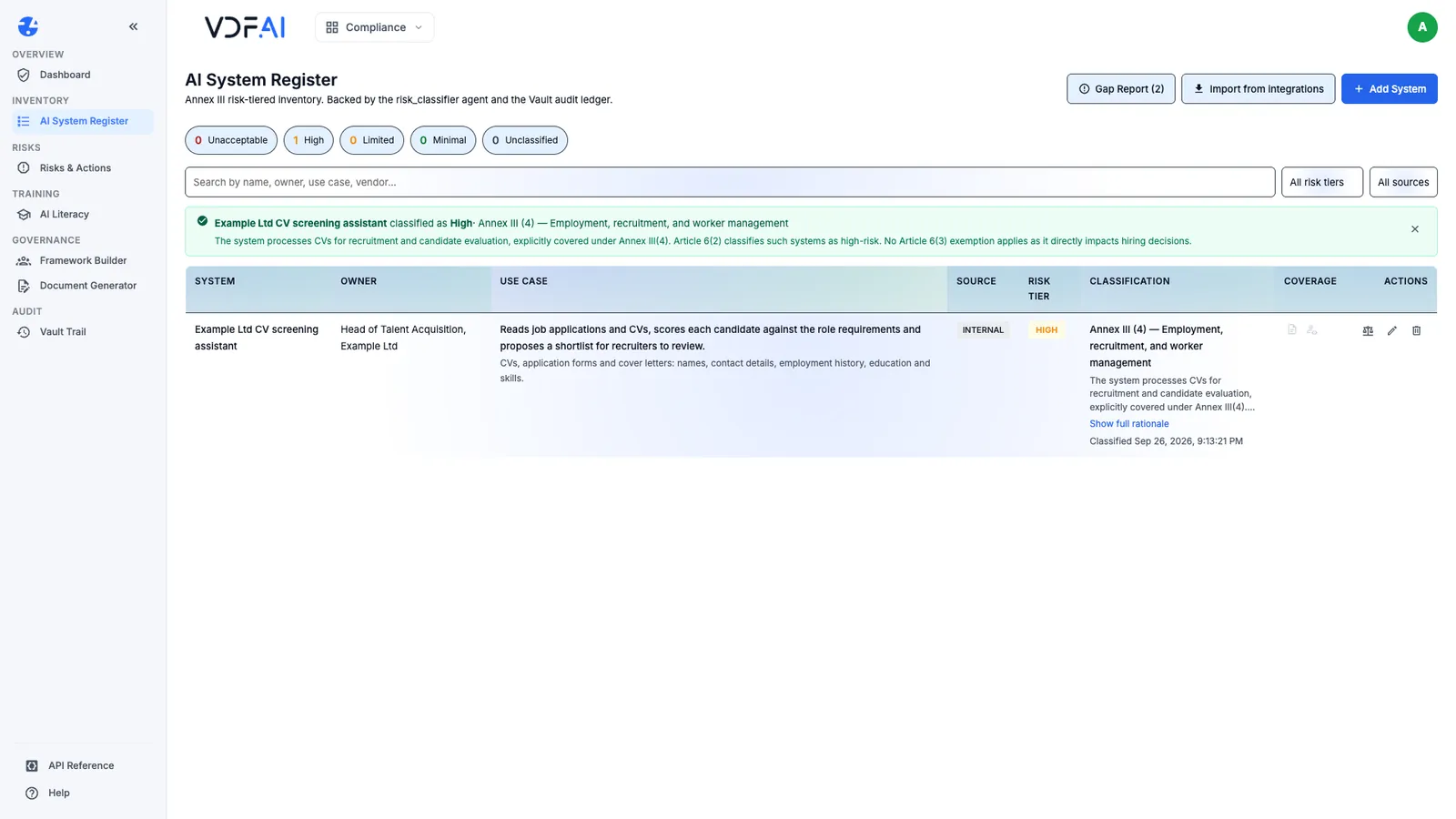
The tier was High, under Annex III point 4, employment, recruitment and worker management. The rationale said the system processes CVs for recruitment and candidate evaluation, that Article 6(2) makes such systems high-risk, and that no Article 6(3) exemption applies because it directly affects hiring decisions. Each row records when it was classified, so a later change of tier is visible.
Step 4: Register vendor and shadow AI too
Add the other three systems the same way, choosing Vendor for the meeting notes tool and Shadow AI for the public chatbot, then classify each one. Each took between 15 and 20 seconds.
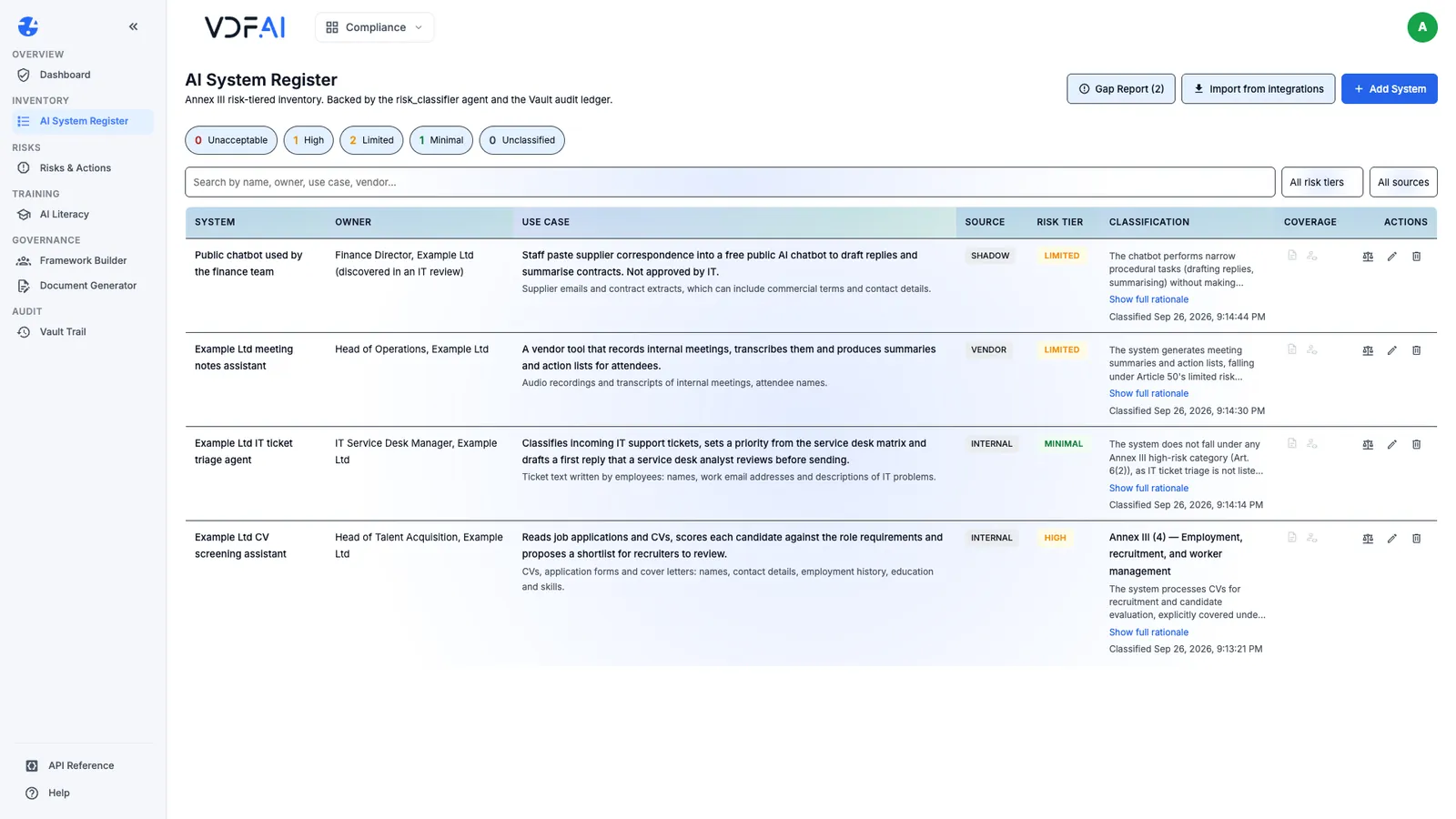
| System | Source | Tier | What the rationale relied on |
|---|---|---|---|
| CV screening assistant | Internal | High | Annex III point 4; Article 6(2) |
| IT ticket triage agent | Internal | Minimal | Not in Annex III; a reviewed draft tool, not a chatbot |
| Meeting notes assistant | Vendor | Limited | Article 50, for generated content |
| Public chatbot used by the finance team | Shadow AI | Limited | Article 6(3), then Article 50 |
The counters above the table now read one high-risk, two limited and one minimal system. Registering vendor and shadow AI matters as much as registering your own builds: the public chatbot processes supplier emails and contract extracts, and nobody had decided whether it should.
Step 5: Review every rationale
A classification is a draft for a person to confirm, and the rationale is what that person reviews. Read each one against the text of the Act.
Three of ours read soundly. The fourth did not. The shadow chatbot’s rationale said Article 6(3) exempts it from high-risk classification because it performs narrow procedural tasks. Article 6(3) describes when a system listed in Annex III is not high-risk; the chatbot is not in Annex III at all, so that provision has nothing to say about it. The tier may still be right, but a reviewer relying on that reasoning would be relying on the wrong article.
Record the outcome of your review next to each system, and choose Edit to correct a tier or the Annex III category when your reviewer disagrees. For the shadow chatbot, the more urgent decision is not its tier but whether Example Ltd allows supplier data to go to a public service at all.
Step 6: Read the gap report
The Gap Report button counts what the register knows is missing. Ours showed two gaps, both for the CV screening assistant: no Article 11 technical documentation and no Article 14 human oversight specification.
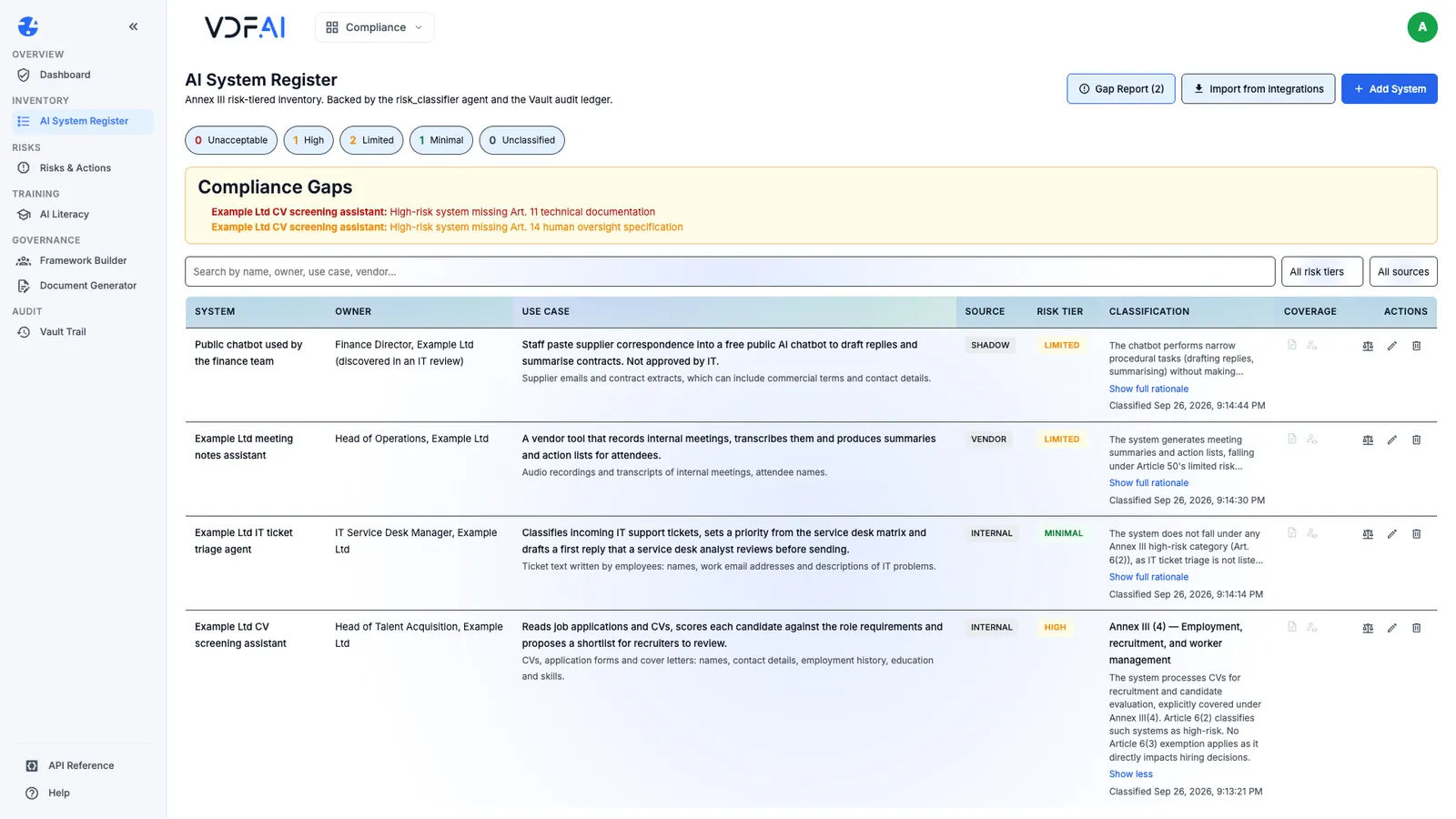
The gap report checks the high-risk systems, which is why the other three do not appear. Each gap clears when the system’s owner ticks the matching coverage flag, and that should happen only when the evidence exists. The classification also opened a finding in Risks & Actions, where the next lesson turns these two gaps into actions with owners and dates.
Check your understanding
Why register the public chatbot the finance team uses without approval?
Because it is in use and it receives supplier data. A register that lists only approved systems misses exactly the uses that most need a decision, whatever their risk tier turns out to be.
The shadow chatbot's rationale relied on Article 6(3). What was wrong with that?
Article 6(3) describes when a system listed in Annex III is not high-risk. The chatbot is not in Annex III, so that provision does not apply to it. The tier may be right while the reasoning is not, and the reasoning is what a reviewer will read.
What does the gap report list for the CV screening assistant, and why only for that system?
That it has no Article 11 technical documentation and no Article 14 human oversight specification. The gap report checks high-risk systems, and it was the only one classified as high-risk.
Reference
Build it in VDF AI
Follow along in your own workspace. The Starter plan is free, with no credit card.
Try VDF AI freeSee it on your own data
Walk through this with a VDF AI engineer, on your infrastructure and your use case.
Book a demoGo deeper with an instructor
Platform Administration and Governance: four live half-days, free for customers and partners.
See the course