In this lesson you will learn to
- Find where EU AI Act findings come from and where they are tracked
- Set a finding's status to reflect what is actually happening
- Write actions with a priority, a due date and the evidence that will close them
- Close a register gap only when its evidence exists
Before you start
- The previous lesson, with a system classified as high-risk
Registering and classifying systems produces findings. A finding on its own changes nothing: it needs someone to own it, actions with dates and a record of the evidence that closed it. VDF AI Compliance keeps all three in Risks & Actions.
We continue with Example Ltd’s CV screening assistant, classified as high-risk in the previous lesson, with two gaps in the register: no Article 11 technical documentation and no Article 14 human oversight specification.
Step 1: See where findings come from
Open Risks & Actions from the Compliance sidebar. Its own description says what feeds it: EU AI Act findings from classification, repository scans and gap reports.
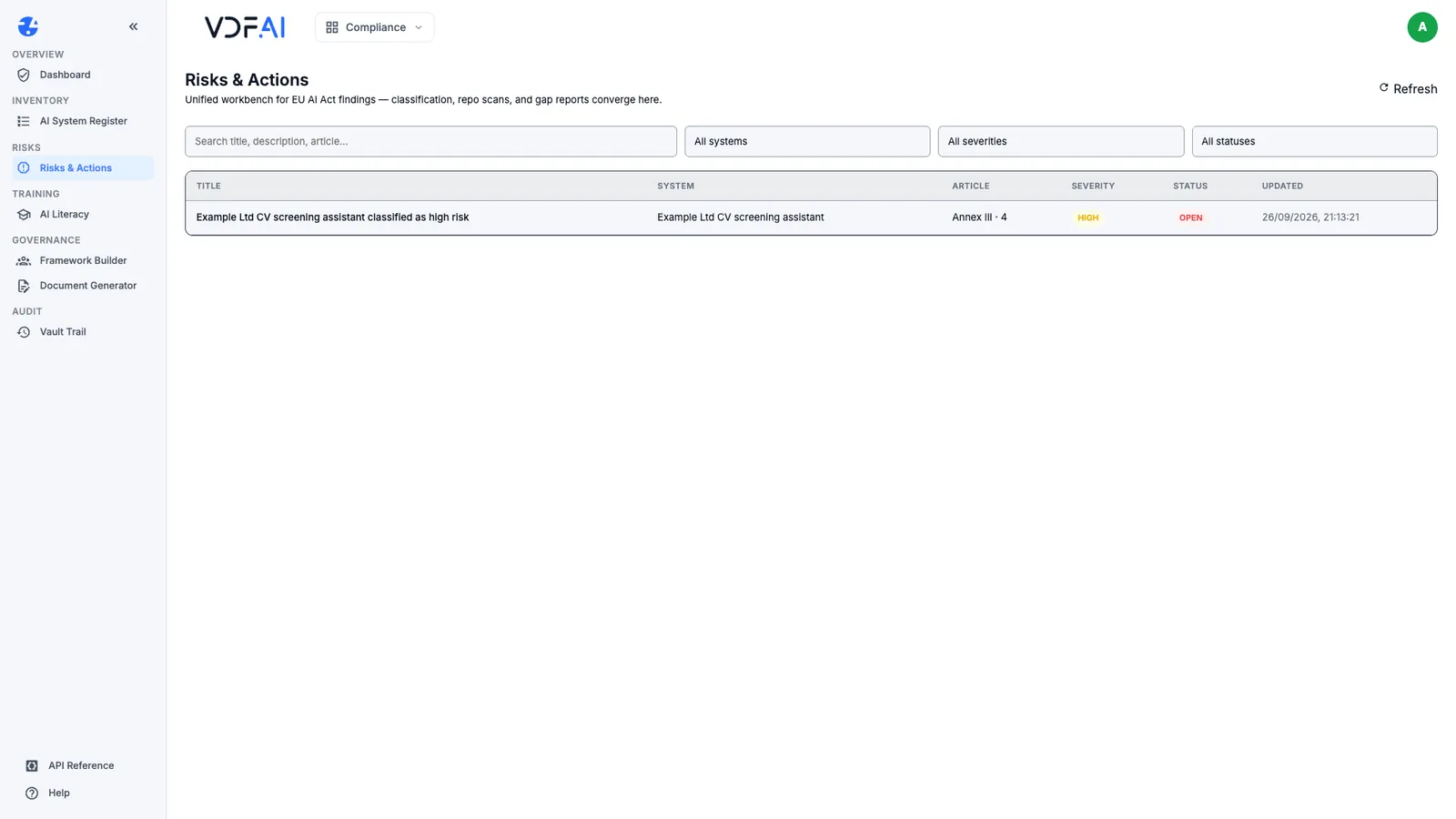
Ours held one finding, created by the classification: Example Ltd CV screening assistant classified as high risk, citing Annex III point 4, severity High, status Open. The three systems classified as limited or minimal risk created no findings. Filters at the top narrow the list by system, severity and status, which starts to matter once the list is longer than one screen.
Step 2: Open the finding and set its status
Choose the finding to open its panel. It repeats the classifier’s rationale, then offers five statuses: Open, In progress, Mitigated, Accepted and Withdrawn.
Set a status that describes what is actually happening, not what you hope will happen. Work on Example Ltd’s finding has started, so we chose In progress.
Step 3: Add actions with a priority and a date
Under Add action, each action takes a title, an optional description, a priority from P0 — critical to P2 — normal and a due date. We added one action per gap:
| Action | Priority | Due |
|---|---|---|
| Write the Annex IV technical documentation | P1 — high | 31 October 2026 |
| Specify human oversight for every shortlist | P1 — high | 16 October 2026 |
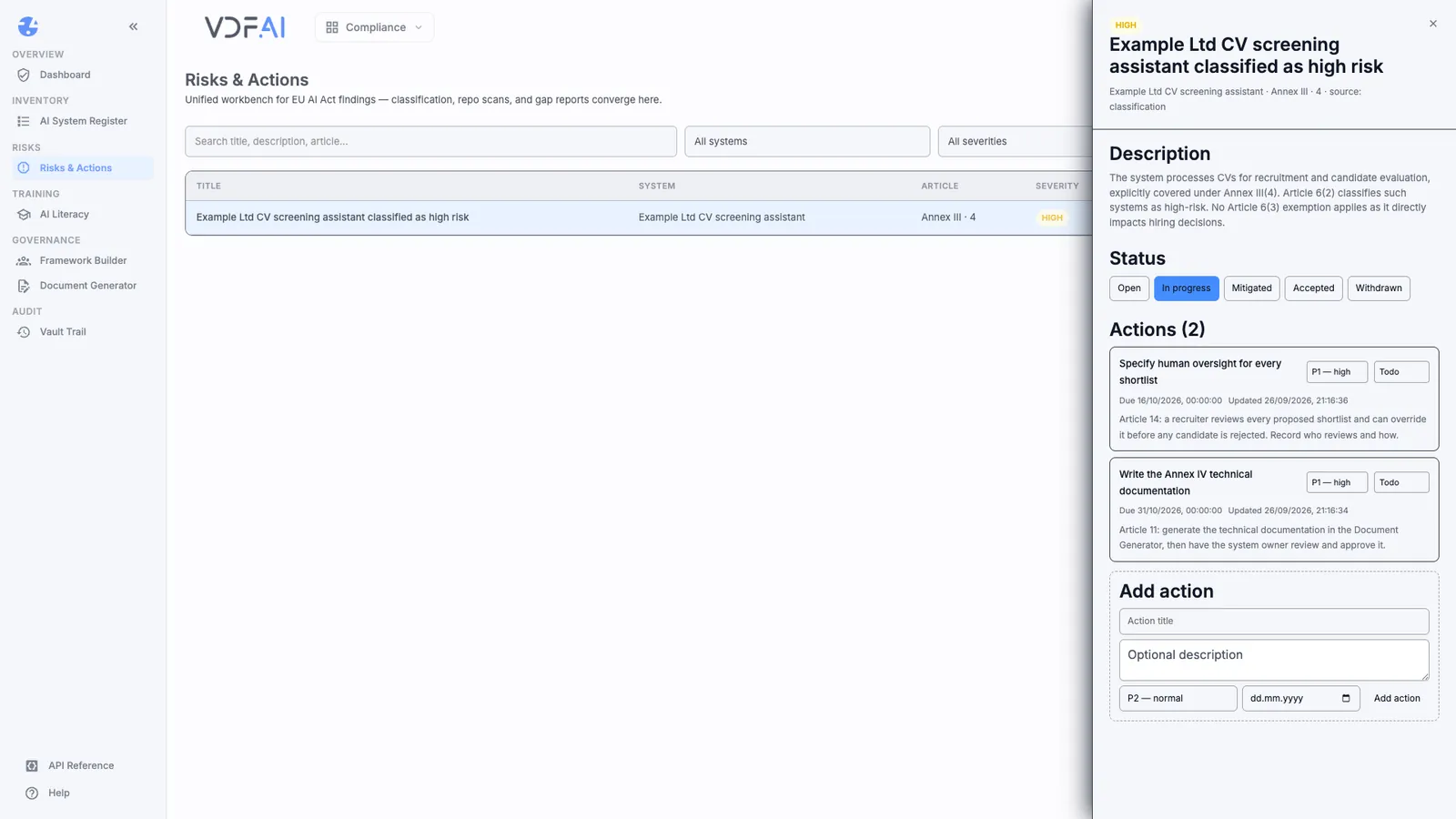
Each action then carries its own status, Todo, In progress, Done or Blocked, and records when it was last updated. Title actions by what will exist when they are done, not by the activity: “Specify human oversight for every shortlist” can be checked; “look into oversight” cannot.
Step 4: Say what evidence closes each action
Use the description to name the evidence. Ours read:
- Documentation: Article 11: generate the technical documentation in the Document Generator, then have the system owner review and approve it.
- Human oversight: Article 14: a recruiter reviews every proposed shortlist and can override it before any candidate is rejected. Record who reviews and how.
Naming the evidence up front stops an action being closed by activity alone. The next lesson generates the documentation draft, and shows why a generated draft is the start of the first action rather than its end.
Step 5: Close the gap when the evidence exists
Register gaps close from the register, not from Risks & Actions. When the system owner has approved the technical documentation, open the system in AI System Register, choose Edit and tick Has Art. 11 documentation.
We tried it to see the effect: the Gap Report count dropped from two to one, leaving only the missing oversight specification.
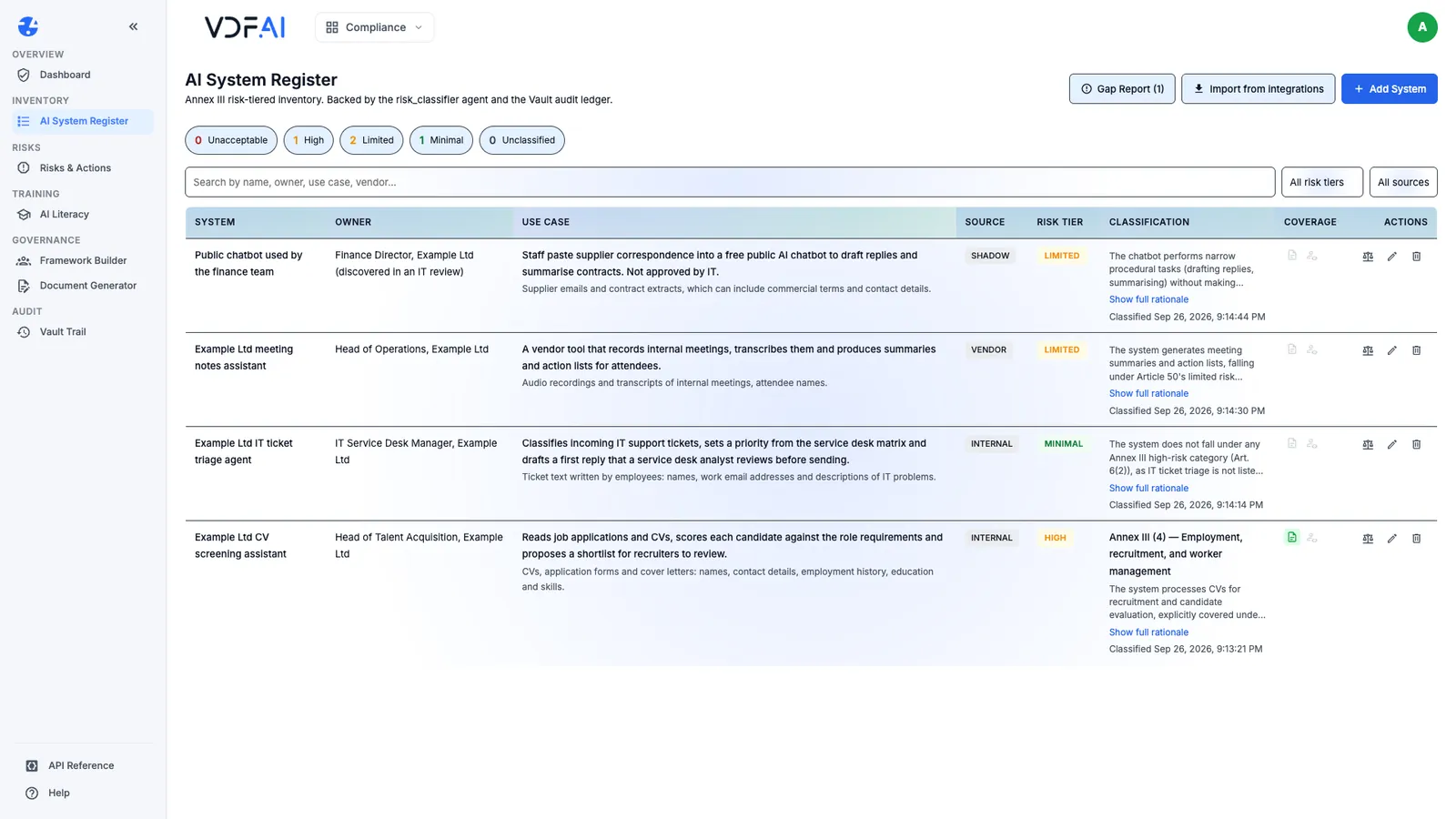
Then we unticked it, because Example Ltd’s documentation was still a draft. The flag is a statement that approved evidence exists. Ticking it early makes the gap report say something untrue, and the gap report is what people will trust.
Step 6: Decide when a finding is finished
A finding is finished when every action is done and its evidence exists. Then set the finding to Mitigated. Use the other two statuses deliberately:
- Accepted records a decision to live with a risk rather than reduce it. Record who decided and why in the description.
- Withdrawn is for a finding that turned out to be wrong, for example after a reviewer changes a system’s classification.
Review open findings on a fixed rhythm, such as a monthly governance meeting, starting with anything Blocked or past its due date.
Check your understanding
Why did we not tick the Article 11 flag after the documentation was generated?
Because a generated draft is not documentation yet. The flag should record that approved documentation exists; ticking it early clears the gap report while the gap is still real.
What makes an action useful to whoever picks it up?
A title that says what will exist when it is done, a priority, a due date and a description naming the evidence that closes it, such as an approved document or a written oversight procedure.
When would a finding be Accepted rather than Mitigated?
When the organisation decides, on the record, to live with a risk instead of reducing it. Mitigated means the actions are done and their evidence exists.
Reference
Build it in VDF AI
Follow along in your own workspace. The Starter plan is free, with no credit card.
Try VDF AI freeSee it on your own data
Walk through this with a VDF AI engineer, on your infrastructure and your use case.
Book a demoGo deeper with an instructor
Platform Administration and Governance: four live half-days, free for customers and partners.
See the course