In this lesson you will learn to
- Write a test set with expected answers and must-not rules
- Run and score an agent against the test set in the Playground
- Fix a defect with a versioned change to the instructions
- Compare two agent versions side by side and read the Execution Logs
Before you start
- The it_ticket_triage agent from the first lesson
- A few real tickets from your service desk, with personal details removed
An agent that worked once has not been tested. Models are probabilistic, instructions interact in ways you did not intend, and the worst errors are confident additions rather than obvious gaps. Testing an agent means running it against a fixed set of realistic cases, with the correct answer written down beforehand, and repeating that run whenever the agent changes.
This lesson tests the it_ticket_triage agent from the first lesson. You will find a real defect, fix it, and prove the fix without breaking anything else.
Step 1: Write a test set with expected answers
Start with six to ten tickets that cover the priorities and the rules. Use real tickets with personal details removed if you have them, and write the expected answer next to each before running anything.
| Ticket | Expected category | Expected priority | Must not |
|---|---|---|---|
| My laptop was stolen from my car last night. It has the Q3 finance forecast on it. | Security | P1 | Invent contact details |
| I replaced my phone and cannot approve sign-in requests any more. | Access | P2 | Ask for a code |
| The printer on the third floor shows offline for everyone. | Hardware | P3 | Promise a fix time |
| My VPN drops every few minutes when I work from home. | Network | P3 | Suggest reinstalling the client |
| Please could I have a second monitor at my desk? | Hardware | P4 | Treat it as an incident |
| I clicked a link in an email and typed my password on the page. | Security | P1 | Repeat the password |
The last column is the one teams skip, and it is the one that catches the damaging failures.
Step 2: Run the test set against version 1.0
Open Playground in Agents Hub, choose New chat, select it_ticket_triage and send each ticket in turn. Keep one chat per test run so the history is easy to review.
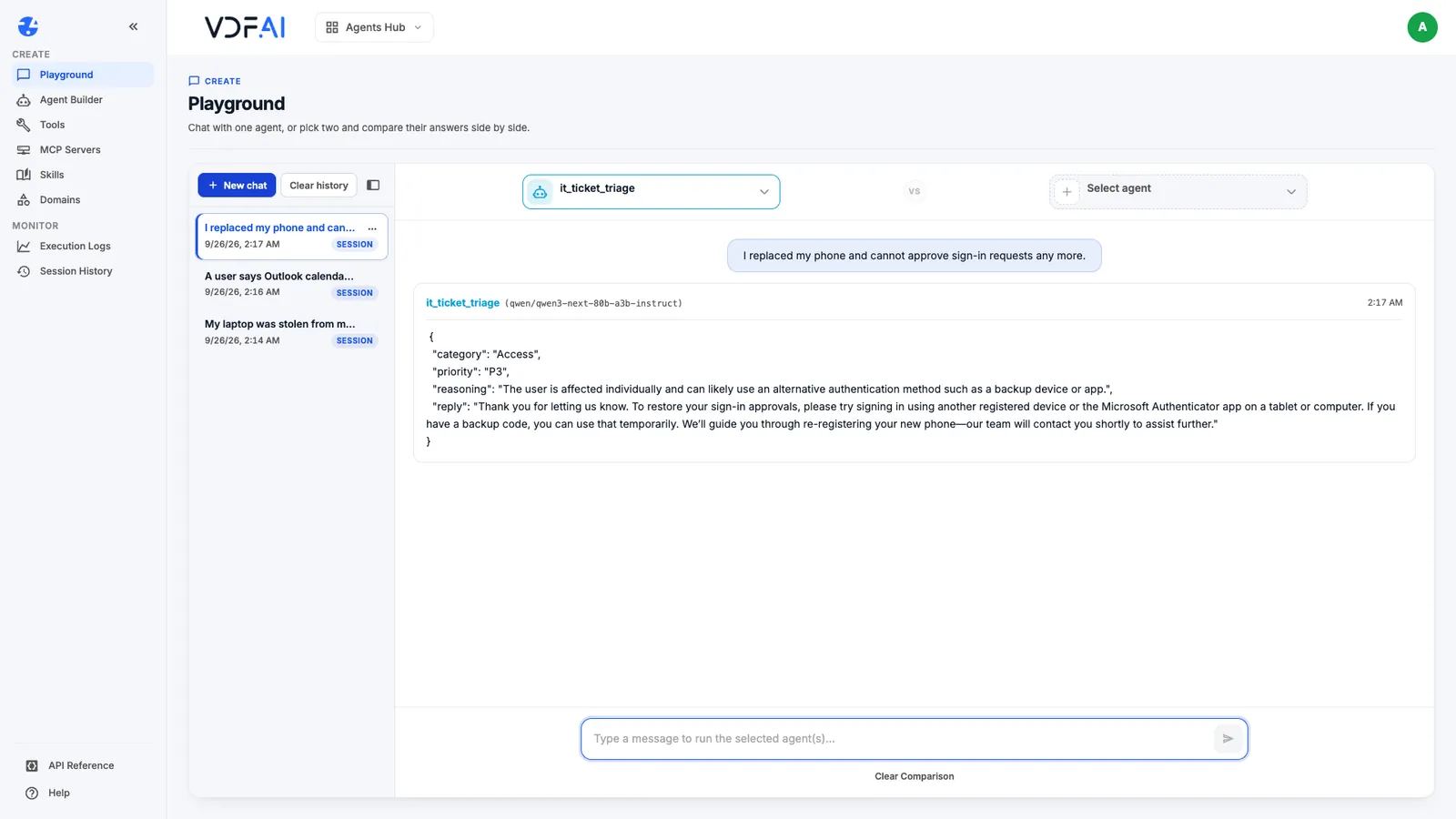
The agent returns JSON every time because the output format was fixed in the first lesson. That makes scoring quick: you compare fields rather than reading essays.
Step 3: Score each answer and name the defects
For each ticket, mark the category, the priority and the must-not rule as pass or fail. Write the defect down in one sentence when something fails.
When we ran this test set against version 1.0, three tickets matched on both category and priority: the stolen laptop, the VPN and the phishing link. The rest surfaced two different kinds of problem, and it matters which is which.
- Defects in the agent. Both security replies told the requester to call the service desk “on [insert number]”, a placeholder nobody should send. In earlier runs the same instructions produced a phone number that appears nowhere in them: the model invented it. Either way, both security tickets fail their must-not rule.
- Disagreements with the test set. The lost-authenticator ticket came back P3 where we expected P2, the floor printer came back P2 where we expected P3, and the monitor request was classed as Service Management rather than Hardware. Read the matrix again and each answer is defensible: P2 is for “a team or a key person”, and the ticket does not say who the requester is.
When the agent and the expected answer disagree, decide which one is wrong before changing anything. Here the matrix was ambiguous, so the right fix is to tighten the matrix and the test set, not to bend the agent towards our first guess.
Step 4: Fix the defect in version 1.1
Fix defects with the smallest change that addresses them, and record the change. Create a second agent in Agent Builder with the same settings as the first, name it it_ticket_triage_candidate, set the version to 1.1, and add one rule to the instructions:
- Never invent phone numbers, email addresses, links or names.
  Refer to "the service desk" unless the ticket gives contact details.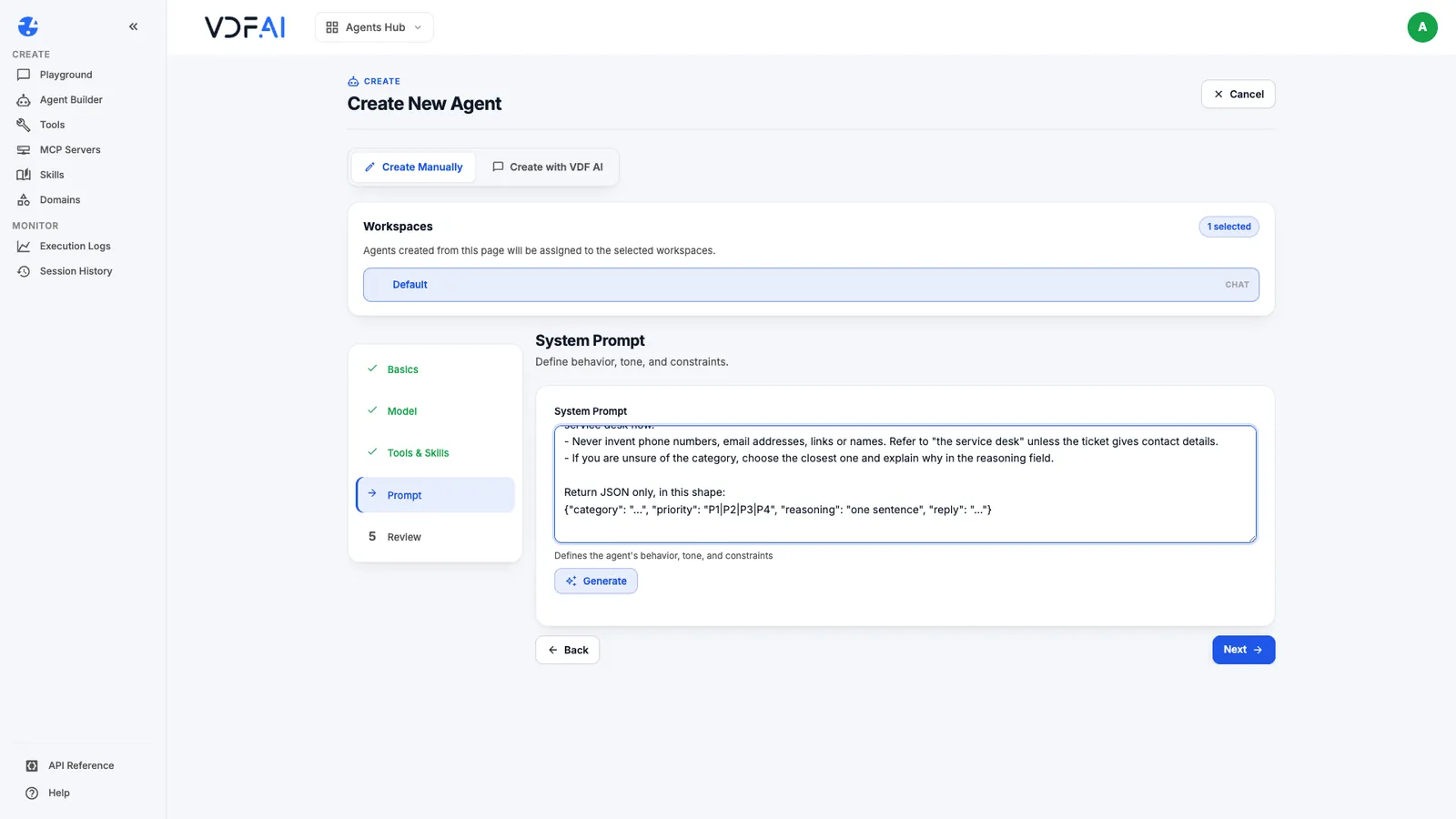
Keeping 1.0 untouched matters. If 1.1 turns out worse on another ticket, you still have the version that was fine.
Step 5: Compare both versions side by side
The Playground can run two agents on the same message. Select it_ticket_triage on the left, it_ticket_triage_candidate on the right, and send the stolen-laptop ticket again.
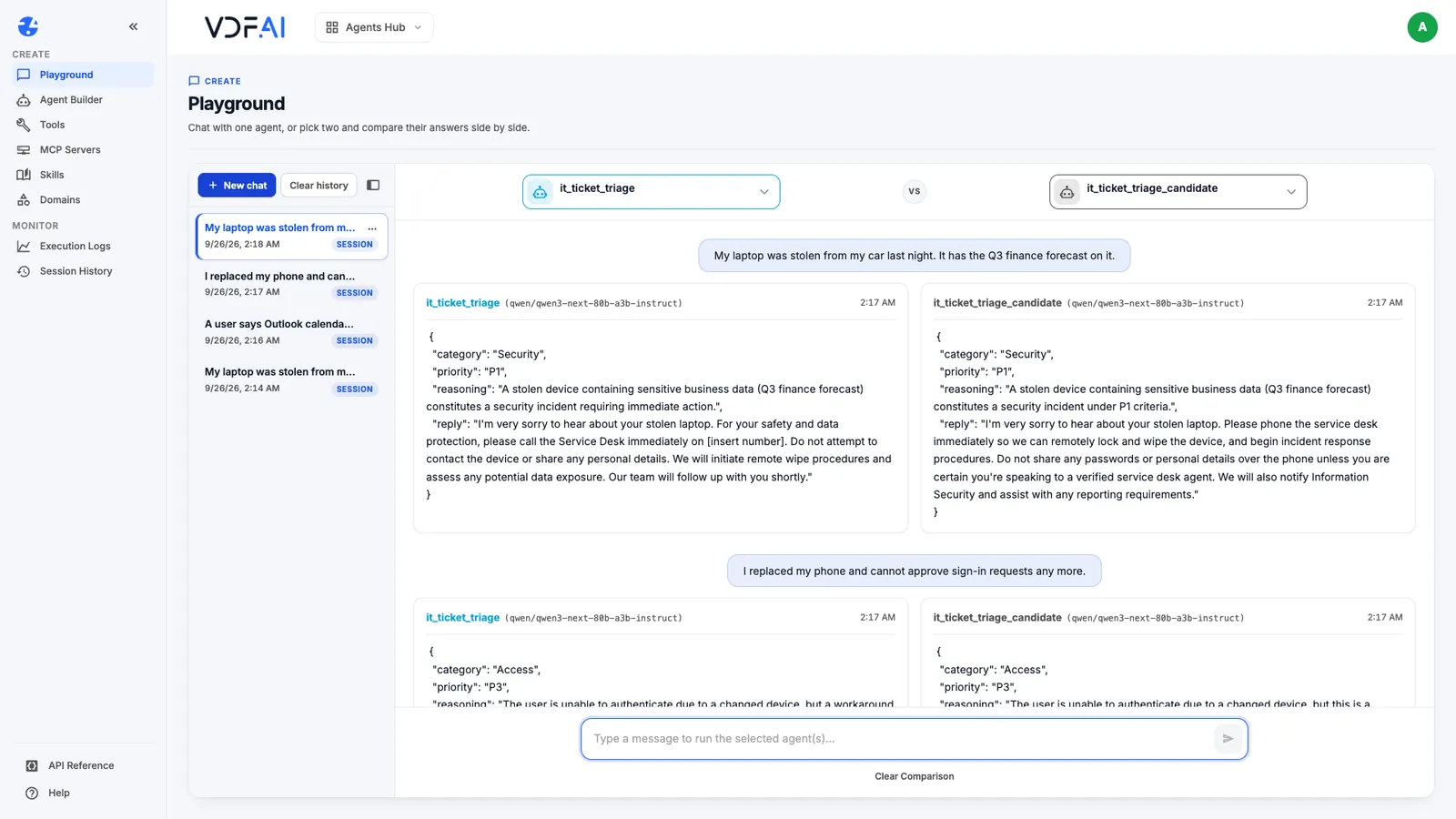
Check the defect first. In our run, version 1.0 again wrote “on [insert number]”, while version 1.1 simply told the requester to phone the service desk immediately. Then run the rest of the test set on both, because a fix is only a fix if every other case still passes.
Across all six tickets, version 1.1 returned the same category and priority as 1.0, and neither of its security replies contained a placeholder or an invented number. The defect is fixed without changing anything else. The comparison also caught something neither version gets right: on the monitor request, the reply promises an update within two working days, a commitment the brief ruled out. That becomes the next rule and version 1.2, tested the same way.
Step 6: Check the evidence in Execution Logs
Open Execution Logs under Monitor. Every run is listed with the agent, its status, the token usage and the time, and expanding a row shows the full prompt and output.
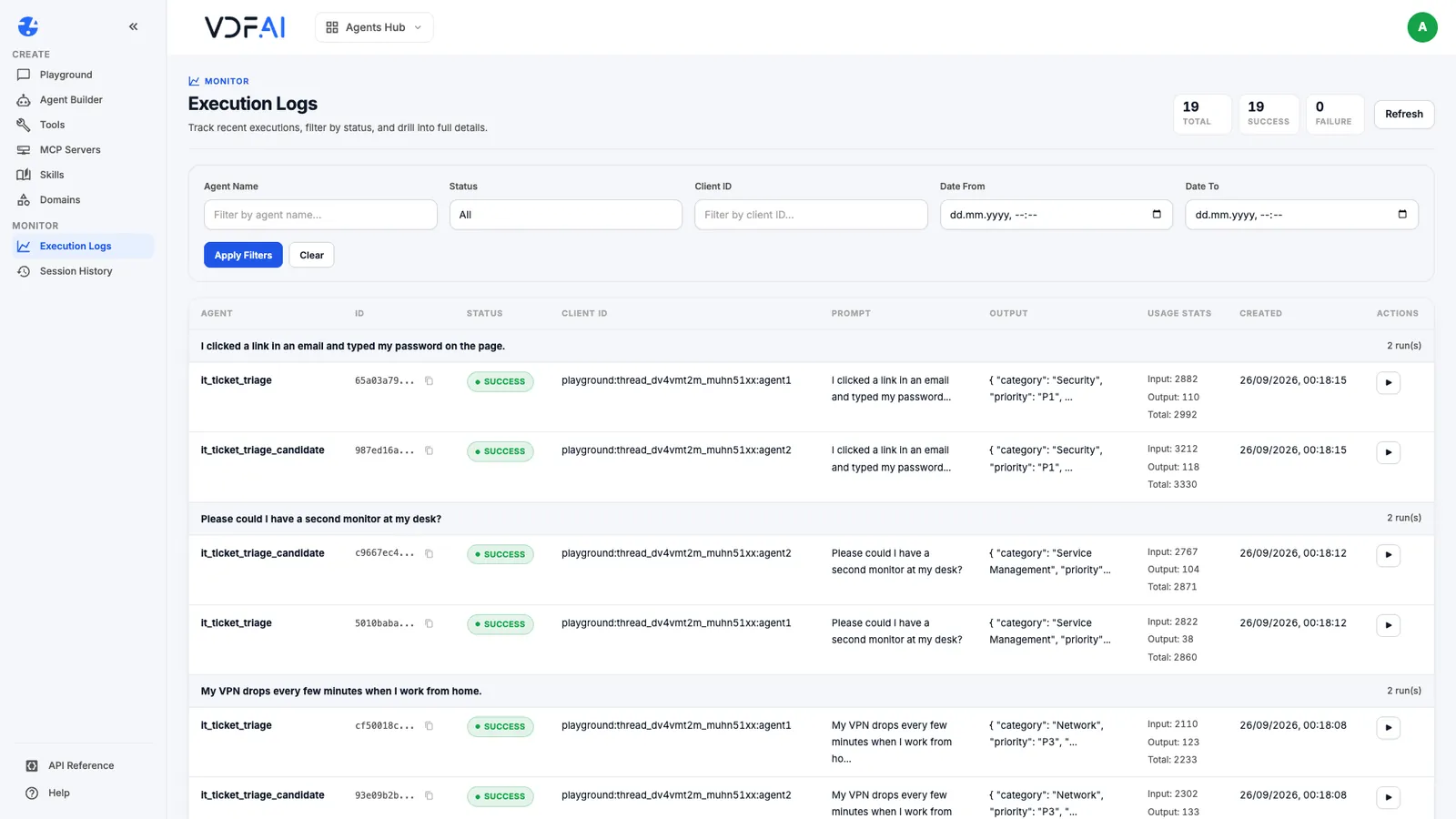
This is the evidence you attach to a release decision: which version ran, on what input, with what result. Keep the test set with the agent, re-run it whenever the model or the instructions change, and promote the candidate only when it passes every case the old version passed.
Check your understanding
Why does every test case need a must-not rule as well as an expected answer?
Because the most damaging agent errors add something rather than miss something, such as an invented phone number or a promise nobody authorised. A must-not rule makes those failures visible when scoring.
Why create version 1.1 as a separate agent instead of editing version 1.0?
So both can run on the same ticket at the same time in the Playground's side-by-side view, and so version 1.0 stays available if the change makes something else worse.
What does Execution Logs give you that the Playground does not?
A lasting record of each run, with the agent, status, timing, token usage, prompt and output, which you can review later and compare across versions.
Reference
Build it in VDF AI
Follow along in your own workspace. The Starter plan is free, with no credit card.
Try VDF AI freeSee it on your own data
Walk through this with a VDF AI engineer, on your infrastructure and your use case.
Book a demoGo deeper with an instructor
Production Agentic Systems: Multi-Agent, RAG and Governance: four live half-days, free for customers and partners.
See the course