In this lesson you will learn to
- Describe what each step of a workflow needs from a model
- Read a step's routing settings and the decision recorded for each run
- Compare automatic routing with pinned models on the same workflow
- Decide which steps to pin and which guardrails to set for the rest
Before you start
- The first lesson in this path, with a saved workflow
Every step in a workflow runs on a model, and the choice matters: it sets the step’s speed, cost, consistency and where the data goes. VDF AI Networks can choose a model per step at run time, or you can fix one. This lesson measures the difference on one real workflow rather than arguing about it.
The workflow is the four-step service desk reply from the first lesson in this path: classify the ticket, draft a reply, verify it against the rules and finalise it.
Step 1: Decide what each step needs
Write one line per step before touching any setting.
| Step | What it needs from a model |
|---|---|
| Classify the ticket | Consistency: the same ticket must get the same priority, in the same format |
| Draft the reply | Good, careful writing |
| Verify the draft | Careful judgement against written rules |
| Finalise the reply | Faithful editing that keeps the checked content |
The first line is the one to watch. When a later step depends on the classifier’s exact output, as the approval rule in the approvals lesson does, a change of model can break the workflow without any error.
Step 2: Read the routing settings
Open a step and choose Edit. Under Model routing, Strategy offers Auto, Pinned, Capability, Energy and Regulated, with a Model field for a pinned model and an Energy Weight slider.
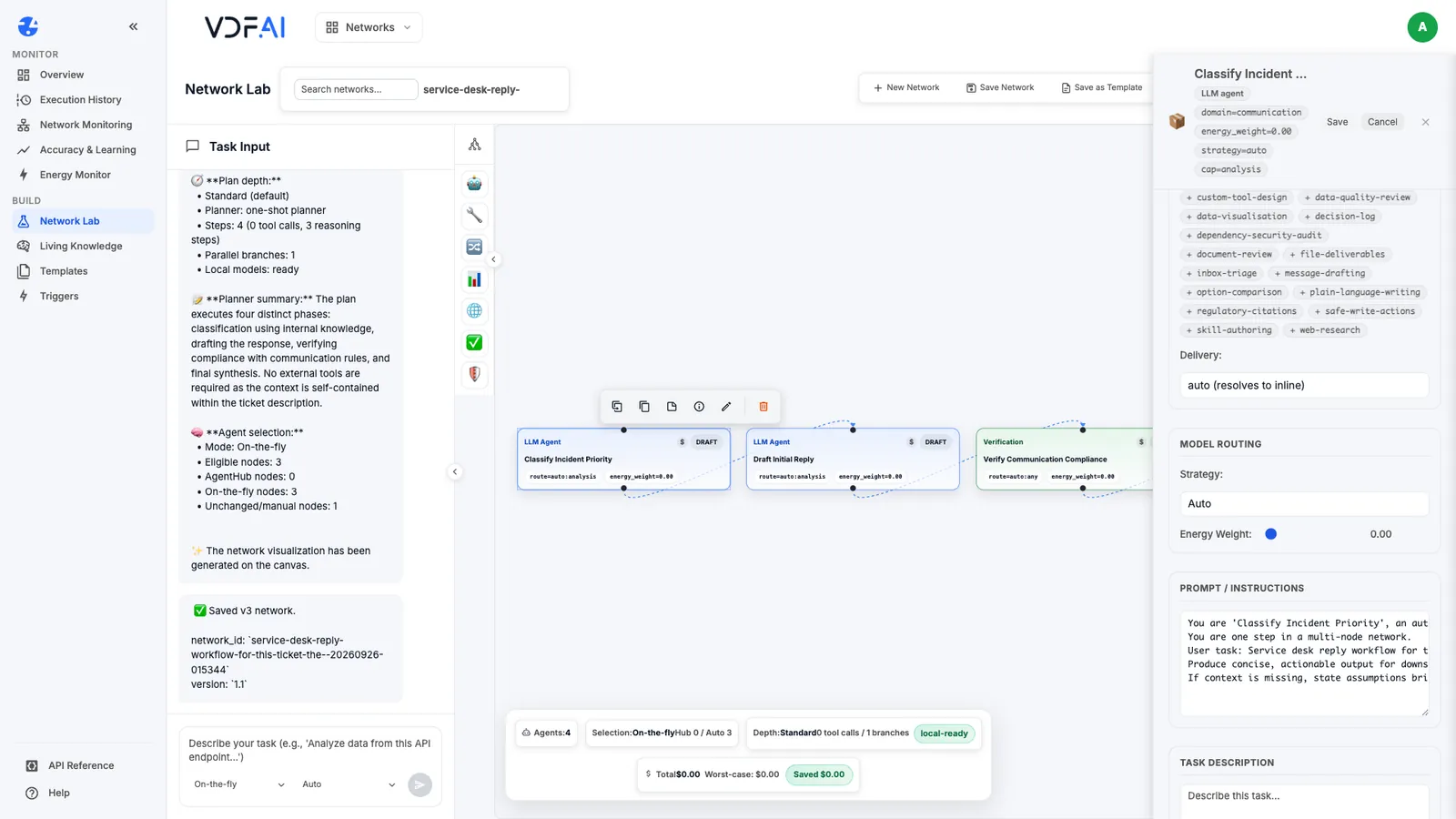
Each card on the canvas shows how its step is routed. route=auto:analysis means the router chooses a model suited to analysis; route=pinned:analysis means the model is fixed. After a run, the cards also show the model used and an estimate of the step’s energy.
Step 3: Run on automatic routing
Generate the workflow, leave every step on Auto, save it and choose Execute.
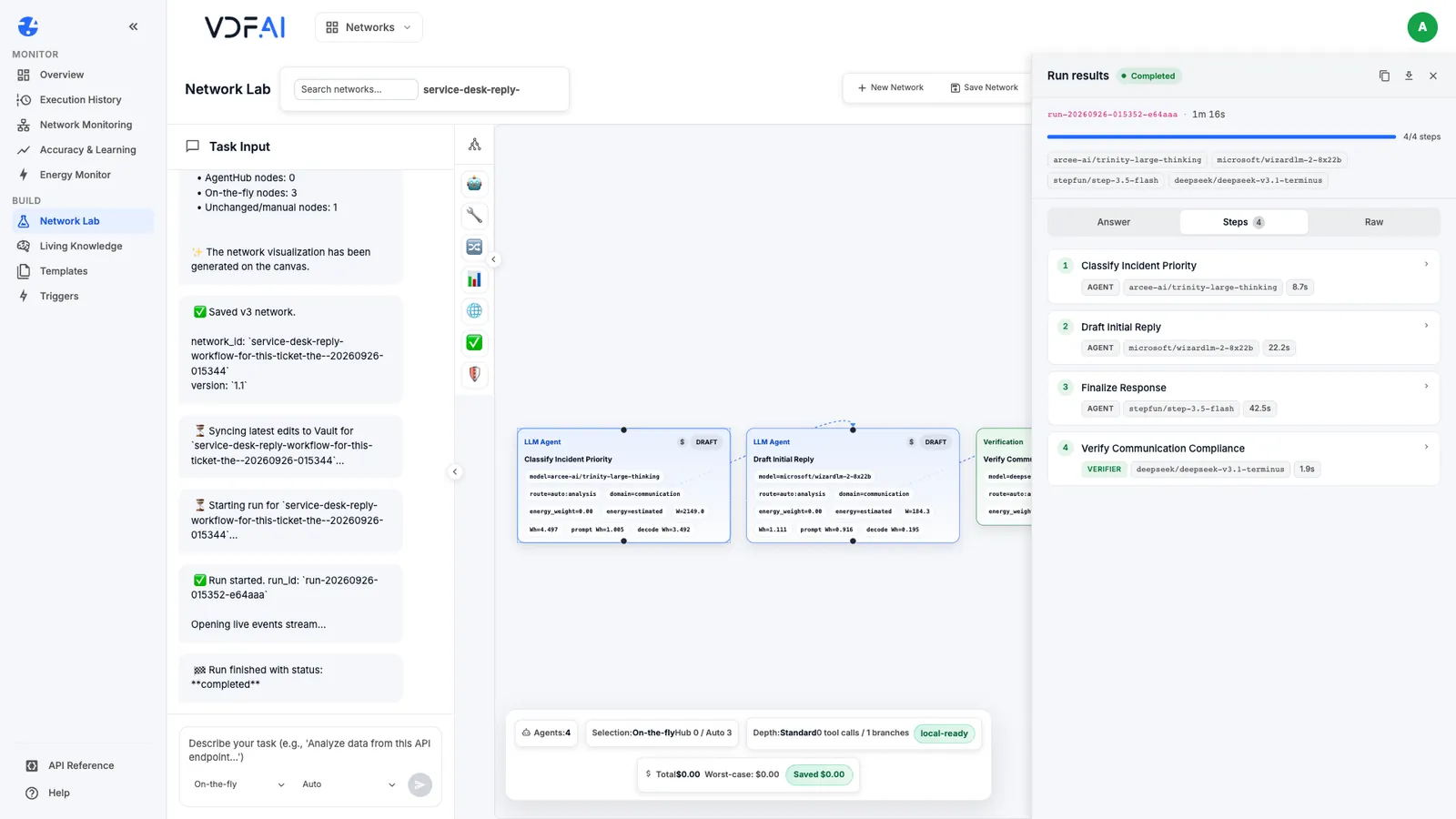
Our automatic run completed all four steps in 1 minute 16 seconds, and it used four different models, one per step. The Raw tab records each decision. Every step shows the reason learned_selection: the router picked from a list of candidates using what it has learned from earlier runs, and some candidates were ruled out because the prompt would not fit their budget. For the classifier, its first choice turned out to be unavailable, and the router moved on to another candidate. The run still completed, but that step took 8.7 seconds, and the draft and final steps took 22.2 and 42.5 seconds.
Step 4: Pin every step and run again
Pin all four steps to one instruction model, as in the first lesson of this path, save and run again.
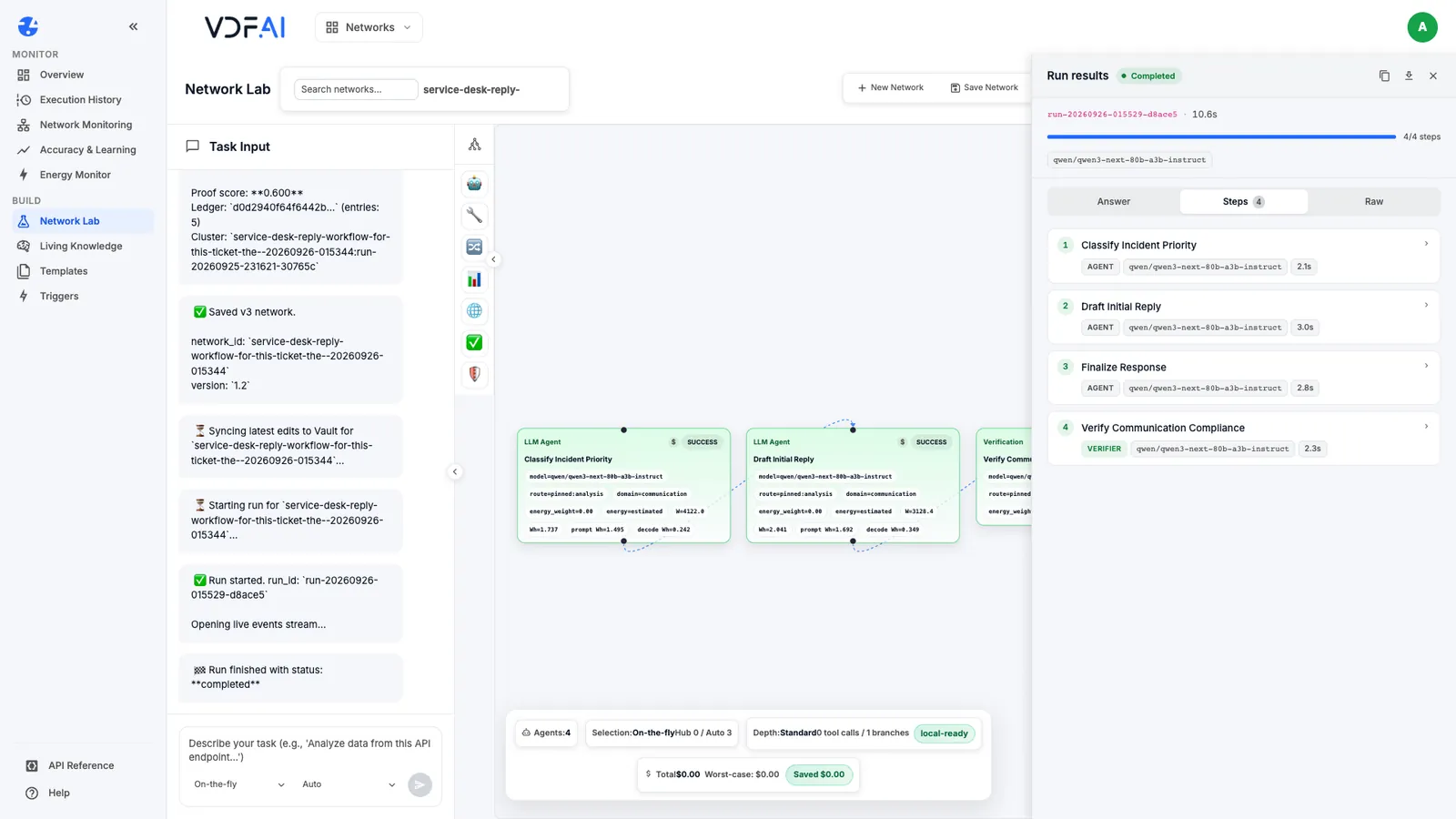
The pinned run completed in 10.6 seconds, with every step between 2.1 and 3.0 seconds, and the Raw tab records the reason pinned_by_config for every step. Same workflow, same ticket, about a seventh of the time, and a result you can reproduce.
Step 5: Choose per step
Neither setting is right everywhere. Use the comparison to decide step by step:
- Pin the steps that others depend on. The classifier drives the approval rule and the priority in the handover, so its format has to hold on every run.
- Pin while you design and test. A test set only means something if the models under it stay still.
- Consider Auto for steps that tolerate variation, such as drafting, and only after you have run the test set with it and compared the results with the pinned version.
Whatever you choose, keep the evidence: the run’s Steps tab shows the model and duration per step, and the Raw tab shows why each model was chosen.
Step 6: Put guardrails around automatic routing
Automatic routing chooses only from what policy allows. In VDF AI Networks, the router applies the policies set by your administrator before choosing: allowed and denied models, and whether external services may be used at all. For a domain flagged as regulated, it chooses only from models approved for regulated use.
Agree on those policies before you leave any step on Auto, especially for workflows that handle personal or regulated data. A pinned step makes the choice visible in the network itself; a policy makes the boundary hold for every step that is not pinned.
Check your understanding
Why did the pinned run finish so much faster than the automatic one?
Automatic routing chose four different models, its first choice for one step was unavailable and had to be replaced, and two of its choices were slow on this task. The pinned run used one fast instruction model for every step.
Which steps are the strongest candidates for pinning?
Steps whose output something else depends on exactly, such as a classifier whose priority line drives an approval rule. A model change there can break the rule without any error.
What limits what automatic routing may choose?
Policies set by the administrator, such as allowed and denied models and whether external services may be used, plus approved-only models for domains flagged as regulated.
Reference
Build it in VDF AI
Follow along in your own workspace. The Starter plan is free, with no credit card.
Try VDF AI freeSee it on your own data
Walk through this with a VDF AI engineer, on your infrastructure and your use case.
Book a demoGo deeper with an instructor
Production Agentic Systems: Multi-Agent, RAG and Governance: four live half-days, free for customers and partners.
See the course